Best APC Line-Interactive UPS for Business (2025 Guide)

Introduction

If you run any kind of business ? retail, office, warehouse, or small data room ? power issues are probably more common than you?d like to admit. Maybe lights flicker, equipment reboots randomly, or your router drops right when you?re closing a sale. Most offices think the problem is ?bad electricity,? but in reality, they?re missing stable voltage regulation and a controlled shutdown path.

A line-interactive UPS solves this without the cost of large online systems. It gives you clean power, voltage stabilization, and battery backup for outages.
This guide walks you through which APC line-interactive UPS makes sense for your business, based on workload, size, and uptime requirements.


Why APC Line-Interactive UPS?

APC is widely used in offices, SMB server rooms, and distributed enterprise sites because their line-interactive units balance cost, reliability, and ease of deployment:

  • Built-in AVR (Automatic Voltage Regulation) for unstable grid conditions

  • Longer battery lifespan compared to standby UPS

  • Simple LCD diagnostics

  • Hot-swappable batteries

  • Broad ecosystem compatibility with servers, switches, POS, and small networking racks


Top APC Line-Interactive UPS Series for Business

(High-level overview ? no unverifiable specs)

1. APC Back-UPS Pro (BR Series)

Best for: Small offices, Wi-Fi routers, POS, workstations
Key strengths: LCD display, AVR boost/trim, silent operation
Why choose it: Ideal for desks, front offices, and retail counters where power dips are frequent.


2. APC Smart-UPS SMT Series

Best for: SMB server rooms and network cabinets
Key strengths: Pure sinewave output, network card support, high battery reliability
Why choose it: Common choice for protecting servers, VoIP systems, NAS, and edge switches.


3. APC Smart-UPS SMX/SMT ?Extended Runtime? Models

Best for: Remote sites, security systems, industrial controllers
Key strengths: Support for external battery packs, advanced management
Why choose it: For environments where outages last longer and controlled shutdown is mission-critical.


Comparison Table: APC BR vs SMT vs SMX (Business Usage)

Feature / Factor Back-UPS Pro (BR) Smart-UPS (SMT/SMX)
Performance Good for office loads Enterprise-grade sinewave power
Voltage Regulation Basic AVR Advanced AVR with tighter stability
Management USB + LCD Network card, remote monitoring
Battery Options Built-in only Optional extended battery packs
Reliability High for SMB Very high for servers & network racks
Power Efficiency Optimized for low loads High-efficiency green modes
Support & Warranty Standard Extended and replacement programs
Best Use Case Workstations, POS, routers Servers, switches, storage
Ideal Business Size Small businesses Medium to enterprise

Pros and Cons of APC Line-Interactive UPS Models

APC Back-UPS Pro (BR Series)

Pros

  • Affordable for SMBs

  • Quiet operation

  • Good protection for electronics

  • Easy to deploy (desk or wall mount)

Cons

  • Not ideal for servers or high-draw equipment

  • Limited monitoring

  • No external battery support


APC Smart-UPS SMT / SMX Series

Pros

  • Pure sinewave output suitable for servers

  • Network monitoring available

  • Strong build quality

  • Supports longer runtime via expansion packs

Cons

  • Higher upfront cost

  • Requires basic IT knowledge to configure

  • Fans can be audible in small rooms


Expert Recommendation: Which APC UPS Should Your Business Choose?

Choose APC BR (Back-UPS Pro) if:

  • Your environment is office-focused

  • You need basic protection for PCs, routers, printers, POS devices

  • Your outages are short and infrequent

  • Budget is limited but reliability still matters

Choose APC SMT/SMX (Smart-UPS) if:

  • You run servers, switches, storage, VoIP, or security systems

  • You want network-based monitoring and alerts

  • Uptime matters more than budget

  • You need support for longer run-times or remote shutdown

Avoid Overinvesting When:

  • You only need to protect a workstation or WiFi router ? BR series is enough

  • You don?t have servers or heavy hardware ? SMT/SMX is unnecessary

  • Your business rarely sees voltage instability ? choose simpler UPS

Spend More When:

  • You run local workloads (ERP, NAS, VoIP) and can?t tolerate sudden shutdowns

  • You operate remote or unmanned sites

  • You need predictable uptime and diagnostics


Real-World Use Cases

1. A 10-person law office

Runs PCs, VoIP phones, router, and a small NAS.
Recommended: APC Smart-UPS SMT
Why: Protects NAS and VoIP from forced reboots, prevents data loss.


2. Retail store with POS + Wi-Fi + CCTV

Typical load: 2?4 POS terminals, router, DVR, cameras.
Recommended: APC Back-UPS Pro
Why: Stable voltage, quick install, low noise.


3. Remote construction site office

Runs a server, switches, LTE modem, and security NVR.
Recommended: APC SMX (Extended Runtime)
Why: Longer outages and no local IT staff.


Final Summary

APC?s line-interactive UPS lineup gives businesses a reliable way to protect equipment from unstable power without the cost of online double-conversion units.
For desktops and light loads, choose Back-UPS Pro.
For servers, storage, and network infrastructure, go with Smart-UPS SMT/SMX.
Match your UPS to your business size, runtime needs, and the criticality of the equipment ? not just the price tag.
APC Smart-UPS vs. Traditional UPS: Which One Should You Choose?

Introduction

Choosing the right Uninterruptible Power Supply (UPS) is crucial for keeping your critical systems online during power outages. If you’re considering options, you’re likely debating between APC?s Smart-UPS line and traditional UPS systems. The decision impacts your performance, energy consumption, maintenance costs, and overall reliability. In this blog, we?ll compare these two types of UPS systems, focusing on their advanced features like remote monitoring, energy efficiency, and cost-effectiveness. By the end, you’ll have the information to choose the best UPS for your business?whether you?re a small office or a large enterprise.

ÿ ÿ ÿ ÿ ÿ ÿ ÿ ÿ ÿ ÿ ÿ ÿ ÿ ÿ ÿ ÿ ÿ ÿ ÿ ÿ ÿ ÿ ÿ ÿ ÿ ÿ ÿ ÿ ÿ ÿÿ ÿ


APC Smart-UPS Overview

APC Smart-UPS line is designed for high performance, providing excellent power protection with advanced features such as network manageability, remote monitoring, and energy efficiency. This line is perfect for businesses of all sizes, especially those looking for detailed control and long-term savings. APC Smart-UPS is built for users who need consistent uptime and minimal disruption, with cloud connectivity that allows IT managers to monitor UPS health and status remotely.

Traditional UPS Overview

Traditional UPS systems are more straightforward, offering basic battery backup and surge protection. They?re typically more affordable upfront and may serve well for small businesses or environments with fewer critical systems. However, they lack the advanced monitoring capabilities and energy efficiency that come with APC Smart-UPS units. For many, this can mean more frequent maintenance checks, higher operational costs, and the risk of unexpected downtimes.


Comparison Table

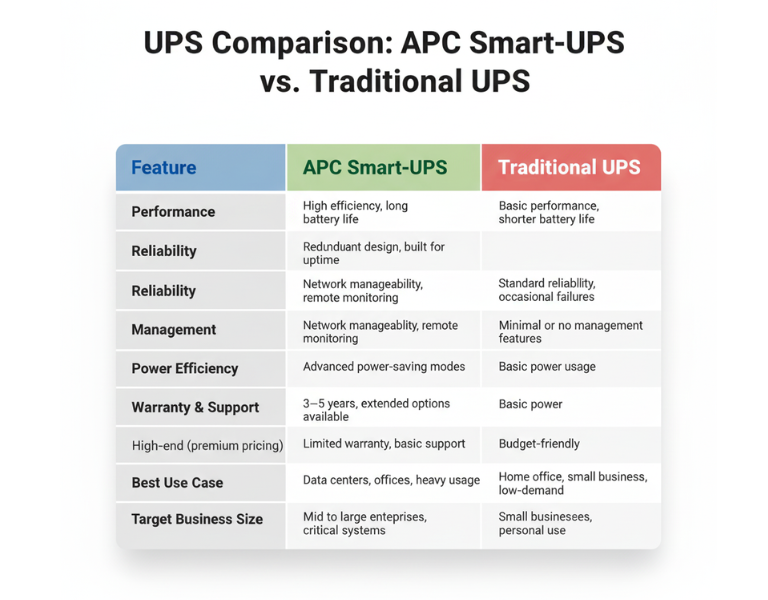
Feature APC Smart-UPS Traditional UPS
Performance High efficiency, long battery life Basic performance, shorter battery life
Reliability Redundant design, built for uptime Standard reliability, occasional failures
Management Network manageability, remote monitoring Minimal or no management features
Power Efficiency Advanced power-saving modes Basic power usage
Warranty & Support 3?5 years, extended options available Limited warranty, basic support
Price Range High-end (premium pricing) Budget-friendly
Best Use Case Data centers, offices, heavy usage Home office, small business, low-demand
Target Business Size Mid to large enterprises, critical systems Small businesses, personal use

ÿ ÿ ÿ ÿ ÿ ÿ ÿ ÿ ÿ ÿ ÿ ÿ ÿ ÿ ÿ ÿ ÿ ÿ ÿ ÿ ÿ ÿ ÿ ÿ ÿ ÿ ÿ ÿ ÿÿ ÿ ÿ
Pros and Cons

APC Smart-UPS

Pros Cons
– Advanced network monitoring – Higher upfront cost
– Real-time health alerts – Requires setup and management
– Energy efficiency reduces costs – Overkill for small setups
– Longer battery life and proactive maintenance – More complex to install

Traditional UPS

Pros Cons
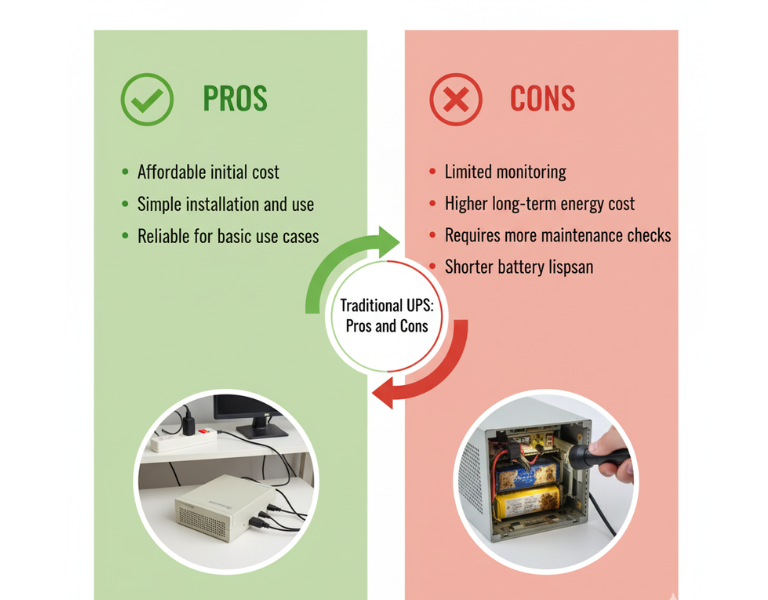
– Affordable initial cost – Limited monitoring
– Simple installation and use – Higher long-term energy cost
– Reliable for basic use cases – Requires more maintenance checks
– Basic surge protection – Shorter battery lifespan

Expert Recommendation

For small businesses or home offices with limited infrastructure, a traditional UPS might be the most cost-effective choice. They?re simple to use and reliable for lower-demand environments, offering essential power protection without unnecessary complexity. However, if your business involves critical systems or you need remote monitoring across multiple locations, investing in an APC Smart-UPS will provide you with greater visibility and long-term savings. The upfront cost is higher, but the benefits of energy efficiency and remote management often outweigh the additional investment in the long run.


Real-World Use Cases

  • Design Studio (Small Business): A small design studio with 10 employees uses a traditional UPS system to protect their file servers and workstations. Since they don?t experience frequent power outages, the basic protection and lower upfront cost are sufficient for their needs.

  • Corporate Data Center (Large Enterprise): A data center with hundreds of servers relies on APC Smart-UPS units for continuous uptime. These units are monitored remotely, ensuring that any battery degradation is addressed before it becomes an issue, minimizing downtime.

  • Retail Store (Small Business): A retail store with a point-of-sale system and inventory management needs basic power protection. A traditional UPS is ideal for their low-maintenance requirements, offering reliability without overinvesting in features they won?t use.

  • Regional Office (Enterprise): A regional office for a large enterprise has several remote workstations that rely on network connectivity. APC Smart-UPS units provide energy efficiency and reduce the need for on-site monitoring. Staff can check UPS health remotely, reducing unnecessary visits and service calls.


Final Summary

Choosing between APC Smart-UPS and traditional UPS systems depends largely on your business size and needs. While traditional UPS systems work well for small-scale operations, APC Smart-UPS systems provide advanced features that make them ideal for larger enterprises or critical environments where uptime and energy efficiency are a priority.