Smart-UPS vs Traditional UPS: Which APC System Fits Your Setup?

Introduction

When you?re planning power protection for servers, switches, or even a simple office setup, the type of UPS you pick matters more than most people expect. You might be deciding between APC?s Smart-UPS line and a basic traditional UPS, and on paper they both ?provide backup power,? but the real-world experience is drastically different. The right UPS affects uptime, remote manageability, battery longevity, operating cost, and even cooling requirements. This guide breaks down the differences in plain language so you can make the right choice for your network size, budget, and operational needs.

Brand Overview

APC?s Smart-UPS series is designed for professional environments where uptime and equipment protection matter ? server rooms, network closets, branch offices, and data centers. They provide clean output, advanced battery management, and options for remote monitoring.

Traditional UPS units ? including basic standby or simple line-interactive models are built for entry-level use. They protect desktops, small routers, and basic office electronics. They?re affordable but limited in monitoring, efficiency, and long-term reliability.

Comparison Table

Category APC Smart-UPS Traditional UPS
Performance Pure sine wave, voltage regulation, stable under variable load Basic output, often simulated sine wave
Reliability Advanced battery management, consistent runtime, hot-swappable options Limited diagnostics, shorter battery life
Remote Monitoring SmartConnect, SNMP, network cards, email alerts, logs Minimal or none; local indicators only
Energy Efficiency High-efficiency modes reduce heat and power use Lower efficiency; higher long-term operating cost
Cost-Effectiveness Higher upfront cost but reduced downtime and lower energy waste Very low cost but limited protections
Scalability Broad capacity range, optional external battery packs Fixed capacity; not built for growth
Best Use Case Servers, switches, storage, VoIP, multi-site deployments Desktops, POS terminals, light office gear
Business Size Small business to enterprise Home office to small office

Pros and Cons

APCÿSmart-UPS

Pros:

  • Provides clean, regulated output ideal for servers and sensitive hardware

  • Remote monitoring allows proactive maintenance

  • Intelligent charging extends battery lifespan

  • High efficiency lowers heat and electricity usage

  • Wide range of sizes and runtime options

Cons:

  • Higher initial cost

  • More configuration required for network management

  • Sometimes more capacity than small offices truly need

TraditionalÿUPS

Pros:

  • Very budget-friendly

  • Simple and quick to deploy

  • Suitable for low-impact devices like PCs and small routers

Cons:

  • No remote alerts or diagnostics

  • Lower efficiency and shorter runtime

  • Not suitable for critical equipment

  • Limited scalability and visibility

Expert Recommendation

If you?re supporting servers, storage, core switches, or anything powering business-critical tasks, a Smart-UPS is the safer investment. The clean power output alone prevents errors and premature hardware wear, and the remote monitoring features reduce downtime by alerting you to battery wear before it becomes a problem.

If your environment is limited to a couple of desktops, a basic router, or a reception workstation, a traditional UPS is perfectly adequate. It keeps costs low while covering essential devices during short outages.

For multi-site operations ? such as retail, healthcare, or branch offices ? Smart-UPS models equipped with remote monitoring are especially useful, letting IT teams oversee battery health and plan replacements without sending technicians onsite.

Real-World Use Cases

Small Office (Desktops + Wi-Fi Router)
A traditional UPS supports short outages, avoids data loss, and keeps connectivity stable without requiring advanced monitoring.

SME with Server + Switch + VoIP
Smart-UPS offers clean sine-wave output and predictable runtime, helping ensure voice calls, file access, and internal systems stay online.

Branch Retail Sites / Clinics / Warehouses
Smart-UPS with remote management lets centralized IT monitor dozens or hundreds of UPS units across locations, reducing labor and eliminating blind spots.

Enterprise Rack Environments
Smart-UPS ensures stable power for virtualization hosts, storage arrays, and Layer-3 switches, with scalable runtime options and precise monitoring.

Final Summary

A traditional UPS is great for basic office gear, but when uptime, monitoring, and efficiency matter, APC Smart-UPS models deliver far better long-term value. The key is matching your UPS choice to your environment?s actual load and risk ? light-duty setups can stay simple, while business-critical systems benefit from the reliability and visibility Smart-UPS provides.
APC Smart-UPS vs. Traditional UPS: Which One Should You Choose?

Introduction

Choosing the right Uninterruptible Power Supply (UPS) is crucial for keeping your critical systems online during power outages. If you’re considering options, you’re likely debating between APC?s Smart-UPS line and traditional UPS systems. The decision impacts your performance, energy consumption, maintenance costs, and overall reliability. In this blog, we?ll compare these two types of UPS systems, focusing on their advanced features like remote monitoring, energy efficiency, and cost-effectiveness. By the end, you’ll have the information to choose the best UPS for your business?whether you?re a small office or a large enterprise.

ÿ ÿ ÿ ÿ ÿ ÿ ÿ ÿ ÿ ÿ ÿ ÿ ÿ ÿ ÿ ÿ ÿ ÿ ÿ ÿ ÿ ÿ ÿ ÿ ÿ ÿ ÿ ÿ ÿ ÿÿ ÿ


APC Smart-UPS Overview

APC Smart-UPS line is designed for high performance, providing excellent power protection with advanced features such as network manageability, remote monitoring, and energy efficiency. This line is perfect for businesses of all sizes, especially those looking for detailed control and long-term savings. APC Smart-UPS is built for users who need consistent uptime and minimal disruption, with cloud connectivity that allows IT managers to monitor UPS health and status remotely.

Traditional UPS Overview

Traditional UPS systems are more straightforward, offering basic battery backup and surge protection. They?re typically more affordable upfront and may serve well for small businesses or environments with fewer critical systems. However, they lack the advanced monitoring capabilities and energy efficiency that come with APC Smart-UPS units. For many, this can mean more frequent maintenance checks, higher operational costs, and the risk of unexpected downtimes.


Comparison Table

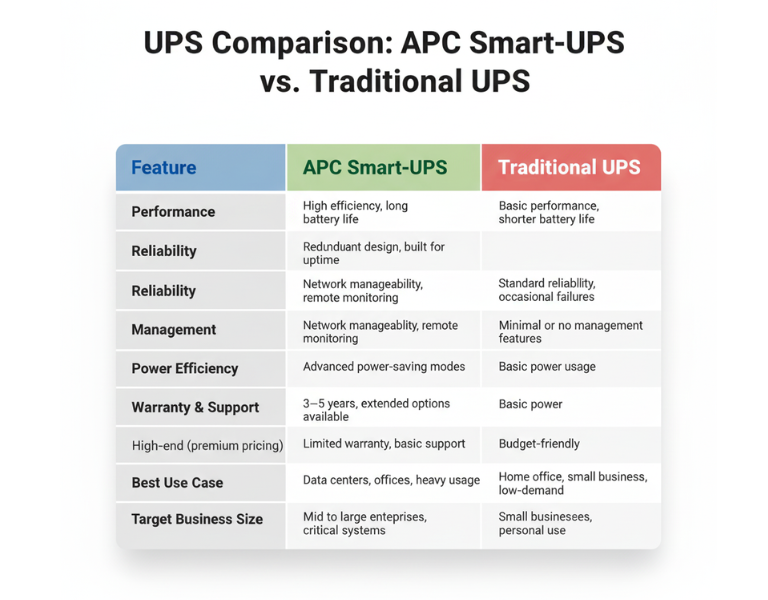
Feature APC Smart-UPS Traditional UPS
Performance High efficiency, long battery life Basic performance, shorter battery life
Reliability Redundant design, built for uptime Standard reliability, occasional failures
Management Network manageability, remote monitoring Minimal or no management features
Power Efficiency Advanced power-saving modes Basic power usage
Warranty & Support 3?5 years, extended options available Limited warranty, basic support
Price Range High-end (premium pricing) Budget-friendly
Best Use Case Data centers, offices, heavy usage Home office, small business, low-demand
Target Business Size Mid to large enterprises, critical systems Small businesses, personal use

ÿ ÿ ÿ ÿ ÿ ÿ ÿ ÿ ÿ ÿ ÿ ÿ ÿ ÿ ÿ ÿ ÿ ÿ ÿ ÿ ÿ ÿ ÿ ÿ ÿ ÿ ÿ ÿ ÿÿ ÿ ÿ
Pros and Cons

APC Smart-UPS

Pros Cons
– Advanced network monitoring – Higher upfront cost
– Real-time health alerts – Requires setup and management
– Energy efficiency reduces costs – Overkill for small setups
– Longer battery life and proactive maintenance – More complex to install

Traditional UPS

Pros Cons
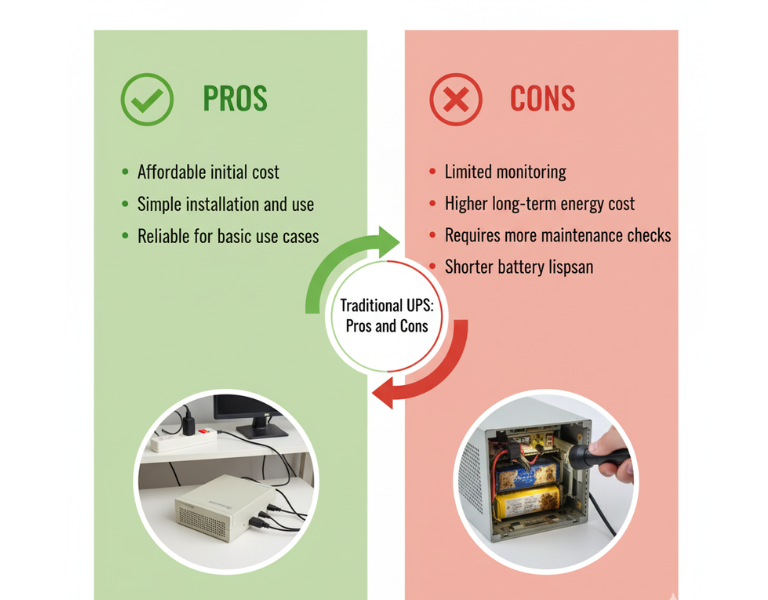
– Affordable initial cost – Limited monitoring
– Simple installation and use – Higher long-term energy cost
– Reliable for basic use cases – Requires more maintenance checks
– Basic surge protection – Shorter battery lifespan

Expert Recommendation

For small businesses or home offices with limited infrastructure, a traditional UPS might be the most cost-effective choice. They?re simple to use and reliable for lower-demand environments, offering essential power protection without unnecessary complexity. However, if your business involves critical systems or you need remote monitoring across multiple locations, investing in an APC Smart-UPS will provide you with greater visibility and long-term savings. The upfront cost is higher, but the benefits of energy efficiency and remote management often outweigh the additional investment in the long run.


Real-World Use Cases

  • Design Studio (Small Business): A small design studio with 10 employees uses a traditional UPS system to protect their file servers and workstations. Since they don?t experience frequent power outages, the basic protection and lower upfront cost are sufficient for their needs.

  • Corporate Data Center (Large Enterprise): A data center with hundreds of servers relies on APC Smart-UPS units for continuous uptime. These units are monitored remotely, ensuring that any battery degradation is addressed before it becomes an issue, minimizing downtime.

  • Retail Store (Small Business): A retail store with a point-of-sale system and inventory management needs basic power protection. A traditional UPS is ideal for their low-maintenance requirements, offering reliability without overinvesting in features they won?t use.

  • Regional Office (Enterprise): A regional office for a large enterprise has several remote workstations that rely on network connectivity. APC Smart-UPS units provide energy efficiency and reduce the need for on-site monitoring. Staff can check UPS health remotely, reducing unnecessary visits and service calls.


Final Summary

Choosing between APC Smart-UPS and traditional UPS systems depends largely on your business size and needs. While traditional UPS systems work well for small-scale operations, APC Smart-UPS systems provide advanced features that make them ideal for larger enterprises or critical environments where uptime and energy efficiency are a priority.