Single-Phase vs Three-Phase UPS: Which One Do You Need?

Introduction

Choose single-phase UPS for low to moderate loads (offices, small server rooms) and three-phase UPS for high-density, scalable, or data center environments.
The decision depends on total load, power distribution, and future expansion?not just current usage.
Incorrect selection leads to inefficiency, capacity limits, or infrastructure mismatch.

Use Case / Deployment Fit

Single-Phase UPS:

  • Small offices
  • Network closets
  • SMB server racks
  • Edge deployments

Three-Phase UPS:

  • Data centers
  • Industrial environments
  • Large server rooms
  • High-density racks

Use three-phase when load exceeds typical single-phase limits or when infrastructure already supports it.

Technical Breakdown

Power Input & Distribution

Single-Phase:

  • One live + one neutral
  • Typically 230V supply
  • Simple installation

Three-Phase:

  • Three live conductors
  • Higher power delivery efficiency
  • Balanced load across phases

Load Capacity

Single-Phase UPS:

  • Typically up to ~10 kVA
  • Suitable for localized loads

Three-Phase UPS:

  • Starts from ~10 kVA and scales upward
  • Supports large, centralized loads

Scalability

Single-Phase:

  • Limited scaling
  • Expansion requires additional standalone units

Three-Phase:

  • Modular scaling options
  • Easier to expand within same infrastructure

Efficiency & Performance

Single-Phase:

  • Efficient at lower loads
  • Simpler design

Three-Phase:

  • Better efficiency at higher loads
  • Reduced conductor size for same power delivery
  • Improved load balancing

Installation Complexity

Single-Phase:

  • Plug-and-play in many cases
  • Minimal electrical changes

Three-Phase:

  • Requires electrical planning
  • Professional installation
  • Distribution panel considerations

Comparison Table (if needed)

Feature Single-Phase UPS Three-Phase UPS
Typical Capacity Up to ~10 kVA 10 kVA and above
Deployment SMB / edge Enterprise / data center
Scalability Limited High
Installation Simple Complex
Efficiency at Scale Lower Higher
Power Distribution Single line Balanced across phases

Limitations & Trade-offs

Single-Phase Limitations:

  • Not suitable for high-density loads
  • Difficult to scale efficiently
  • Can lead to uneven load distribution

Three-Phase Limitations:

  • Higher upfront cost
  • Requires compatible infrastructure
  • Overkill for small deployments

Procurement Insight

  • Calculate total load in watts before deciding
  • If load is approaching 8?10 kVA, evaluate three-phase early
  • Consider future expansion, not just current load
  • Align UPS type with building power infrastructure
  • Factor in installation and maintenance complexity

Organizations deploying UPS at scale often align procurement with infrastructure standards and source equipment through distributors likeÿDC Supplies to maintain consistency across sites.

Real-world Scenarios

Scenario 1: Small Office Deployment

  • Load: 1.5 kW
  • Requirement: Short runtime for safe shutdown
  • Choice: Single-phase UPS

Scenario 2: Growing Server Room

  • Load: 7 kW, expected to grow
  • Decision: Evaluate transition to three-phase
  • Outcome: Avoid future redesign

Scenario 3: Data Center Rack Row

  • Load: 20 kW+
  • Requirement: Scalable and balanced power
  • Choice: Three-phase UPS

Final Recommendation

Use single-phase UPS for small, localized IT loads where simplicity and cost matter.
Choose three-phase UPS when dealing with high power demands, scalability requirements, or data center environments.
If growth is expected, planning for three-phase early avoids costly redesign later.
APC Smart-UPS vs Easy UPS: Which One Should You Choose?

Introduction

If you’re running servers or any critical workload, choose Smart-UPS. If you’re backing up basic office equipment, Easy UPS is enough.

The difference isn?t branding?it?s power quality, control, and failure risk. Smart-UPS is built for uptime; Easy UPS is built for affordability and basic protection.

Use Case / Deployment Fit

Smart-UPSÿ? where it actually belongs

  • Server rooms (single rack or edge sites)
  • Virtualization hosts, storage, firewalls
  • Network closets with uptime requirements
  • Branch offices with centralized shutdown policies

Easy UPS ? where it makes sense

  • Desktop PCs and small offices
  • POS systems and routers
  • Low-risk environments where downtime is acceptable

Decision logic:

  • If downtime costs money ? Smart-UPS
  • If downtime is inconvenient ? Easy UPS

Technical Breakdown

Power Quality

  • Smart-UPS: Pure sine wave output (required for modern server PSUs)
  • Easy UPS: Often simulated/stepped sine wave (model dependent)

Impact:

  • Pure sine = stable PSU operation, no stress on active PFC power supplies
  • Simulated sine = acceptable for basic electronics, not ideal for servers

Topology & Voltage Handling

  • Smart-UPS uses line-interactive with AVR, correcting voltage without switching to battery
  • Easy UPS typically offers simpler regulation with less precision

Impact:

  • Smart-UPS handles unstable grids (common in Pakistan/MEA regions)
  • Easy UPS may switch to battery more often or pass fluctuations through

Runtime Control & Shutdown

  • Smart-UPS: Predictable runtime + PowerChute integration
  • Easy UPS: Basic shutdown (often manual or limited automation)

Impact:

  • Smart-UPS supports graceful shutdown of multiple systems
  • Easy UPS risks abrupt shutdown in multi-device environments

Monitoring & Management

  • Smart-UPS: Network management (SNMP, SmartConnect, remote alerts)
  • Easy UPS: Minimal or no advanced monitoring

Impact:

  • Smart-UPS fits managed IT environments
  • Easy UPS fits standalone setups

Scalability & Lifecycle

  • Smart-UPS: Battery replacement, extended runtime options
  • Easy UPS: Limited scalability

Impact:

  • Smart-UPS is deploy-once, scale-later
  • Easy UPS is replace-on-growth

Comparison Table

Attribute Smart-UPS Easy UPS
Target Environment Servers, critical IT Basic office equipment
Output Waveform Pure sine wave Simulated / stepped sine
Voltage Regulation Advanced AVR Basic regulation
Runtime Predictability High Limited
Remote Monitoring Yes (SNMP / cloud) Minimal / none
Shutdown Integration Automated (PowerChute) Basic / manual
Scalability Expandable runtime Limited
Cost Higher upfront Lower upfront
Risk Profile Low (production-safe) Moderate (non-critical only)

Limitations & Trade-offs

Smart-UPS

  • Higher initial cost
  • Network card often optional
  • Overkill for simple desktop use

Easy UPS

  • Lower power quality
  • Limited runtime visibility
  • Not suitable for sustained server loads

Procurement Insight

  • The price gap is typically small compared to downtime risk
  • Smart-UPS reduces:
    • Unexpected shutdowns
    • PSU stress failures
    • Operational inconsistencies
  • Easy UPS only makes sense when:
    • Budget is constrained
    • Load is non-critical
    • No centralized IT control is needed

Enterprise IT buyers in the US often source these systems from established distributors like DC Suppliesÿfor faster availability and standard rack deployments.

Real-world Scenarios

Scenario 1: Small office (20?30 users)

  • Smart-UPS: server + firewall + switch stack
  • Easy UPS: user desktops

Scenario 2: Branch office with no IT staff

  • Smart-UPS ensures automatic shutdown and remote alerts
  • Easy UPS creates manual dependency ? higher risk

Scenario 3: Unstable power grid

  • Smart-UPS AVR stabilizes voltage continuously
  • Easy UPS cycles battery more frequently ? shorter battery life

Final Recommendation

Choose Smart-UPS if:

  • You run servers, virtualization, or storage
  • You need predictable runtime and controlled shutdown
  • Power quality is inconsistent

Choose Easy UPS if:

  • You only need backup for desktops or routers
  • Budget is the primary constraint
  • Downtime has low impact

There?s no real overlap: Smart-UPS is infrastructure; Easy UPS is convenience.

APC Smart-UPS vs APC Back-UPS: Which One Is Right for Business Use?

Introduction

Choosing the right Uninterruptible Power Supply (UPS) is critical for maintaining uptime, protecting equipment, and avoiding data loss in business environments. APC offers two major UPS product lines:

  • Smart?UPS ? designed for business and enterprise environments
  • Back?UPS ? geared toward home offices and small businesses

Understanding the differences helps you match the right UPS to your power needs, budget, and reliability expectations.

Quick Answer (Featured Snippet Target)

Which UPS is right for business use?

  • APCÿSmart?UPS: Best for enterprise, servers, storage, networking, and mission?critical systems with advanced management needs.
  • APC Back?UPS: Suitable for small offices, desktops, and non?critical systems where cost and basic protection matter more than advanced control.

Technical Comparison

Smart?UPS Overview

Smart?UPS units are built for business and data center usage. They feature:

  • Pure sine?wave output (better for sensitive IT equipment)
  • Scalable runtime with external batteries
  • Network management card options (remote monitoring)
  • Advanced battery management

Ideal for:
Servers, virtualization hosts, storage arrays, networking gear

Back?UPS Overview

Back?UPS models are designed for basic power protection and smaller workloads:

  • Simpler setup
  • Battery backup for desktops, POS systems, and edge devices
  • Basic surge protection

Ideal for:
Small offices, workstations, printers, point?of?sale

Feature Comparison Table

Feature APC Smart?UPS APC Back?UPS
Target Use Case Enterprise & mission?critical Small business & home office
Output Type Pure sine wave Stepped approximation
Runtime Scalability Yes (external battery packs) Limited
Management Advanced (network cards + software) Basic
Form Factor Rackmount & tower Mostly tower
Surge Protection Yes Yes
Cost Higher Lower
Remote Monitoring Yes Limited or no

Pros and Cons

APC Smart?UPS

Pros

  • Excellent protection for business systems
  • Pure sine?wave output
  • Scalable and remotely manageable
  • Better battery life and diagnostics

Cons

  • Higher cost upfront
  • More complex configuration

APCÿBack?UPS

Pros

  • Affordable power protection
  • Easy setup
  • Good for desktops and small equipment

Cons

  • Not ideal for critical server infrastructure
  • Limited expandability and remote control
  • Basic battery runtime

Business Use Case Scenarios

1. Small Office or Workstation Deployment

Recommended: APC Back?UPS
Use it for desktops, printers, POS terminals, and basic network switches where uptime is important but not critical.

2. Server Room or Small Data Center

Recommended: APC Smart?UPS
Servers, storage units, and networking equipment demand clean power, management features, and scalable runtime.

3. Remote Branch Offices

Recommended: APC Smart?UPS (mid?range)
Remote locations benefit from remote monitoring and reporting.Choosing Based on Needs

Priority Recommended UPS Line
Low budget & basic protection Back?UPS
Business servers & network equipment Smart?UPS
Remote sites needing monitoring Smart?UPS
Desktops and small devices only Back?UPS

Conclusion

  • APC Smart?UPS is the best choice for business environments that require advanced protection, remote management, and scalable runtime.
  • APC Back?UPS is ideal for smaller business setups, basic protection needs, and cost?conscious situations.

The right choice depends on your equipment criticality, monitoring needs, and budget.

APC Smart-UPS vs APC Easy UPS: Which One Should Businesses Buy?


Introduction

If you’re deciding between APC Smart-UPS and Easy UPS for a business environment, this is not a close comparison. Smart-UPS is designed for servers and critical infrastructure, while Easy UPS is built for basic power backup. The difference shows up in power quality, runtime control, and long-term reliability. For most SMB and enterprise deployments, choosing the wrong line leads to downtime risk?not just cost savings.

Which one should you choose?

Choose Smart-UPS for any server or critical workload.
Choose Easy UPS only for basic networking or non-critical devices.

Compared Modelsÿ

1500VA pure sine wave UPS designed for servers and network infrastructure

Entry-level UPS for basic office and networking equipment

Rackmount Smart-UPS for multi-server environments and scalable runtime

Online Easy UPS model for entry-level critical load protection

Product Comparison Table

Attribute APC Smart-UPS SMT1500C APC Easy UPS SMV1500 APC Smart-UPS SMT2200RM2U APC Easy UPS SRV2000
Target Use Servers / IT Basic office Server racks Entry critical load
Output Waveform Pure sine wave Simulated / varies Pure sine wave Pure sine (online)
Topology Line-interactive Line-interactive Line-interactive Online (double conversion)
Runtime Control Predictable Limited Expandable Expandable
Battery Expansion Limited / optional No Yes Yes
Management Advanced (SNMP, shutdown) Basic Advanced Moderate
Reliability High (enterprise use) Moderate High Moderate?High
Price Range $$ $ $$$ $$?$$$
Best Use Case SMB servers PCs / switches Multi-server racks Small critical loads

Technical Breakdown

Smart-UPS (What businesses actually need)

  • Pure sine wave output?required for modern server PSUs
  • Designed for servers, storage, and network infrastructure
  • Predictable runtime and graceful shutdown support (PowerChute)
  • Advanced monitoring (SmartConnect, SNMP options)

Reality in deployment:

  • Stable under continuous load
  • Handles mixed IT environments (servers + switches + firewalls)
  • Industry standard for SMB and enterprise racks

Easy UPS (Where it actually fits)

  • Lower-cost entry-level UPS
  • Often simulated sine wave (varies by model)
  • Limited runtime and expansion
  • Basic management

Reality in deployment:

  • Works fine for desktops, routers, and small offices
  • Not designed for sustained server loads
  • Limited control during shutdown scenarios

Pros and Cons

Smart-UPS

Pros

  • Reliable for production server environments
  • Clean power output (protects hardware)
  • Predictable runtime + shutdown integration
  • Long lifecycle with battery replacement

Cons

  • Higher upfront cost
  • Network management card may be optional

Easy UPS

Pros

  • Lower cost
  • Simple deployment
  • Suitable for basic office equipment

Cons

  • Not ideal for servers
  • Limited runtime control
  • Lower power quality
  • No real scalability

Procurement Insight

  • If your workload includes servers, virtualization, or storage, Smart-UPS is not optional?it?s required.
  • Easy UPS is only justified when protecting non-critical devices like routers or small office setups.
  • The cost difference is minor compared to the risk of downtime or hardware damage.
  • For growing businesses, Smart-UPS reduces long-term risk and avoids early replacement.

If you’re sourcingÿAPC UPS systems in the US, suppliers likeÿDC Supplies typically stock both Smart-UPS and Easy UPS models, which helps standardize deployments across branches.

Real-World Use Cases

Office (25?50 users)

  • Smart-UPS 1500VA ? server + firewall + switches
  • Easy UPS ? backup for non-critical endpoints

Multi-branch business

  • Smart-UPS at each site
  • Centralized shutdown and consistent runtime

Server rack / small data room

  • Smart-UPS 2200?3000VA
  • Easy UPS not suitable for this scenario

Final Recommendation

Choose Smart-UPS if you are running anything business-critical.
Choose Easy UPS only for low-risk environments where downtime is acceptable.

Avoid using Easy UPS for servers?it introduces operational risk that outweighs the cost savings.

Eaton UPS Sizing Guide: How to Choose the Right Capacity for Your Office or Server Room

Introduction

UPS sizing gets confusing quickly. Maybe you?ve added a few new servers, your PoE switches are running hotter than usual, or a brief outage last week dropped your VoIP phones and access points. The problem is simple: most offices and IT rooms either oversize a UPS and overspend, or undersize it and get no meaningful runtime. This guide walks you through picking the right Eaton UPS capacity based on real loads, real power factors, and real business requirements ? not theoretical lab specs.


EatonÿOverview

Eaton is known for reliable electrical protection, strong power management software, and UPS models that maintain stable output under mixed IT loads. Their units generally provide better voltage regulation and scalability compared to many entry-level alternatives. Eaton?s line also covers a wide range ? from compact line-interactive units for workstations to fully scalable double-conversion systems for server rooms and small data centers.


Eaton UPS Sizing Comparison

(Example capacities commonly evaluated for offices & small server rooms)

Criteria Eaton 1500VA (Line-Interactive) Eaton 3000VA (Online Double-Conversion)
Performance Good for desktops/edge gear High stability for servers & storage
Reliability Moderate, AVR-supported Very high, consistent output
Management USB/Network Card optional Full network management, advanced logs
Power Efficiency Higher efficiency Lower efficiency but superior protection
Warranty & Support Standard coverage Extended options available
Price Range Low?mid Mid?high
Best Use Case Small office equipment Server rooms, VoIP, switches, storage
Target Business Size 1?20 users 20?100+ users

Pros and Cons of EatonÿUPS Options

Eaton 1500VA (Line interactive UPS)

Pros

  • Lower cost and simple installation

  • Good for workstations, small switches, APs

  • Generally quieter operation

  • Higher efficiency

  • Smaller footprint

Cons

  • Limited runtime on heavier loads

  • Not ideal for servers or virtualized environments

  • Less precise voltage conditioning

Eaton 3000VA (Double Conversation Online UPS)

Pros

  • Stable, clean power regardless of input fluctuations

  • Ideal for rack servers, storage, VoIP, and critical switches

  • Supports network management cards

  • Better handling of sudden load spikes

  • Optional extended battery modules

Cons

  • Higher cost

  • Generates more heat

  • Requires more rack depth and ventilation


Expert Recommendation

If you?re protecting desktops, light PoE switches, or general office equipment, a 1500VA unit is typically enough ? especially when loads sit below 600?800W. But if you?re running hypervisors, storage arrays, or anything that needs clean and predictable power, the 3000VA class gives you the reliability and runtime you actually need. For mixed Cisco/HP switching, VoIP, and one or two servers, a 2200?3000VA online UPS usually hits the sweet spot. Avoid oversizing unless you’re planning hardware growth within 12?18 months.


Real-World Use Cases

Design Studio (20?25 users):
One virtualization host running file storage and two managed switches. A 2200?3000VA unit provides enough headroom for short outages and clean shutdowns.

Small Office (10?15 users):
PoE switch powering phones and APs, plus a firewall. A 1500VA line-interactive model can support 10?15 minutes of runtime.

Server Room (40?60 users):
Two stacked switches, VoIP, and multiple VMs. A 3000VA double-conversion UPS with optional expansion batteries ensures stable runtime and proper failover.


Final Summary

Choosing the right Eaton UPS comes down to watts, power factor, and how long your systems must stay online during an outage. Line-interactive fits light office loads, while double-conversion protects critical servers and network infrastructure. Size for your real load, not the label rating, and leave room for growth.

Upgrade your power protection with Eaton UPS solutions, backed by expert guidance from DC Supplies. Whether you?re equipping a small office or securing an entire server room, we help you size the right unit, avoid over-spending, and ensure your network stays online when it matters. Get dependable performance, fast availability, and professional support tailored to your environment. Reach out toÿDC Supplies to choose the right Eaton UPS for your business.

Eaton vs APC: Which UPS Brand Makes More Sense for Your Business?

Introduction

Most businesses only look at UPS capacity and price, but the real differences show up during voltage swings, unexpected outages, or when a battery fails at the wrong time. Eaton and APC are the two most common UPS brands you?ll see in server rooms, branches, and network closets, but they?re optimized for slightly different priorities. This guide breaks down how each behaves in real environments so you can choose the unit that fits your workload, not someone?s sales pitch.

Brand Overview

Eaton focuses on electrical performance, high-efficiency designs, and strong power conditioning. Their line-interactive and online units are popular in SMB and mid-market deployments because of reliability, long battery life, and solid monitoring options.

APC is known for broad product availability, simple deployment, and user-friendly management. They dominate office and branch environments and offer a wide range of capacities with predictable performance and long-standing industry trust.

Comparison Table

Category Eaton APC
Performance Strong AVR, high efficiency, robust internal components Stable output, wide model range, consistent runtime
Reliability Strong power conditioning, long battery lifespan Proven track record, dependable for mixed workloads
Management Advanced monitoring, hot-swap options Easy-to-use tools, broad ecosystem support
Power Efficiency Typically higher efficiency ratings Good efficiency across most lines
Warranty & Support 2?3 years depending on model 2?3 years depending on model
Price Range Generally mid-range Mid-to-high depending on series
Best Use Case Servers, storage, network racks Offices, branches, mixed IT environments
Target Business Size SMB?Mid-Market Micro?Enterprise

Pros and Cons

Eaton

Pros

  • Strong voltage regulation and efficiency

  • Long-lasting batteries on many models

  • Good fit for virtualization hosts and NAS units

  • Hot-swap support on higher-tier units

Cons

  • Some models cost slightly more

  • Interface can be more technical

  • Fewer low-end units compared to APC

APC

Pros

  • Wide product selection

  • Simple deployment and management

  • Strong ecosystem compatibility

  • Good value for general office loads

Cons

  • Some models run warmer

  • Batteries may need replacement sooner

  • Certain features locked behind accessories

Expert Recommendation

If your environment runs servers, storage appliances, or anything sensitive to voltage fluctuations, Eaton generally provides better electrical performance and efficiency. For offices with mixed devices, branch setups, or locations where simplicity and wide availability matter, APC often fits better.
If your workload is mostly network gear and light compute, either brand works?pick based on price and size. For heavier VM or NAS workloads, Eaton usually offers stronger long-term value.

Real-World Use Cases

1. Small Office with Switches and ISP Gear
APC is usually the easier drop-in option with predictable runtime and simple management.

2. SMB Server Room Running ESXi or Hyper-V
Eaton?s stronger AVR and efficiency help stabilize heavier loads.

3. Distributed Retail Branches
APC fits well where easy replacements and broad availability matter.

Final Summary

Both Eaton and APC deliver solid protection, but they?re optimized for different needs. Eaton leans toward performance and efficiency, while APC excels in simplicity and broad availability. Choose based on workload sensitivity, runtime expectations, and the level of monitoring your environment requires.

Need help choosing the right UPS for your network, server room, or edge workload? DC Supplies can match Eaton and APC models to your exact power requirements, runtime needs, and budget. Whether you?re protecting a single switch or a full rack, we?ll help size the right unit and ensure you get reliable, long-term protection without overspending. Reach out to DC Supplies for tailored recommendations and fast procurement.

Why APC Line-Interactive UPS is a Game Changer for Your Business

Introduction

In today?s business world, power interruptions can cause significant disruptions, resulting in lost productivity and potential damage to equipment. Whether you’re running servers, network equipment, or even a small office, reliable power protection is crucial.

The APC Line-Interactive UPS (Uninterruptible Power Supply) offers a practical, cost-effective solution for businesses of all sizes. Unlike basic surge protectors, it provides both surge protection and battery backup, ensuring your equipment stays operational during power outages and voltage fluctuations.

This blog explains why an APC Line-Interactive UPS can be a game changer for your business, offering a reliable, affordable solution to prevent downtime and protect your valuable IT assets.


What is an APC Line-Interactive UPS?

An APC Line-Interactive UPS is a power protection system that not only provides backup power during outages but also offers voltage regulation for minor power fluctuations. It works by automatically adjusting for slight variations in incoming power, saving your equipment from potential damage without immediately relying on the battery.

Key features include:

  • Automatic Voltage Regulation (AVR): Keeps the voltage stable, preventing equipment damage from voltage dips or surges.

  • Pure Sine-Wave Output: Provides clean, stable power to sensitive equipment, such as servers and networking devices.

  • SmartConnect: Enables cloud-based monitoring, providing real-time alerts and system status remotely.


Key Benefits of APC Line-Interactive UPS for Your Business

  1. Reliable Power Protection
    APC Line-Interactive UPS systems protect against power disruptions, such as blackouts, brownouts, and voltage spikes, ensuring your business stays operational.

  2. Cost-Effective Solution
    APC?s UPS systems offer excellent protection at a lower cost compared to more complex online UPS systems, making them ideal for small and medium-sized businesses.

  3. Energy Efficiency
    Designed to optimize energy use, these UPS systems provide the necessary power with minimal waste, helping reduce your business?s energy consumption and cost.

  4. Remote Monitoring
    With SmartConnect, you can monitor your UPS remotely, receive alerts, and track system health without needing physical access to the device.

  5. Scalability
    APC?s UPS systems are scalable, meaning you can easily add additional units as your business grows, ensuring long-term protection without major upgrades.


APC Line-Interactive UPS: Ideal for Small to Medium-Sized Businesses

The APC Line-Interactive UPS is a perfect fit for businesses that:

  • Require reliable protection for IT equipment such as servers, routers, and POS systems.

  • Need an affordable yet dependable solution for power backup.

  • Operate in areas with moderate power quality issues, such as occasional surges and sags.

  • Seek easy-to-manage, remote-monitoring features without extensive infrastructure needs.


Comparison Table: APC Line-Interactive UPS Models

Feature APC Smart-UPS 1000VA APC Smart-UPS 1500VA APC Smart-UPS 2200VA
Performance 1000VA / 600W 1500VA / 900W 2200VA / 1320W
Voltage Regulation Automatic Voltage Regulation (AVR) AVR AVR
Power Efficiency High High High
Pure Sine-Wave Output Yes Yes Yes
Warranty & Support 3 years 3 years 3 years
Remote Monitoring SmartConnect SmartConnect SmartConnect
Price Range $450?$550 $650?$750 $1,100?$1,300
Best Use Case Small office or home office Small to medium-sized business Medium-sized business or rack setups
Target Business Size Up to 15 users 15?30 users 30+ users

Pros and Cons of APC Line-Interactive UPS

APC Smart-UPS 1000VA

Pros:

  • Cost-effective for small office use.

  • Provides essential surge protection and backup power.

  • Pure sine-wave output for sensitive devices.

Cons:

  • Limited to smaller setups (under 15 users).

  • Shorter runtime under full load compared to higher-capacity models.

APC Smart-UPS 1500VA

Pros:

  • Ideal for medium-sized businesses or server rooms.

  • Good power capacity and longer battery runtime.

  • Reliable AVR for consistent voltage regulation.

Cons:

  • Higher initial cost than the 1000VA model.

  • Slightly bulkier than smaller models.

APC Smart-UPS 2200VA

Pros:

  • Excellent for businesses with heavier IT equipment.

  • Longer runtime under load, suitable for multiple servers.

  • Strong reliability with high-capacity power.

Cons:

  • Larger footprint and higher price point.

  • May be overkill for small offices or light loads.


Expert Recommendation: Is APC Line-Interactive UPS Right for Your Business?

For small to medium-sized businesses, the APC Smart-UPS 1500VA provides the best balance of cost, capacity, and features. It offers strong protection for servers and network devices, making it ideal for businesses looking for affordable yet reliable power backup.

If you?re operating a small office with minimal IT infrastructure, the 1000VA model may be sufficient. However, for larger operations with multiple devices, the 2200VA model will provide ample capacity and ensure the longevity of your equipment, particularly if you?re dealing with more sensitive or high-demand setups.


Real-World Use Cases for APC Line-Interactive UPS

  1. Small Design Studio (10-15 users)
    A design studio with a few high-powered workstations benefits from the APC Smart-UPS 1000VA, providing surge protection and backup power during outages to prevent data loss and keep the creative process uninterrupted.

  2. Growing Office with Multiple Servers (20-30 users)
    A marketing company with multiple servers, network switches, and workstations would rely on the APC Smart-UPS 1500VA, offering robust backup power, energy efficiency, and seamless monitoring through SmartConnect.

  3. Larger Office Setup (30+ users, multiple racks)
    A tech company with a small data center would use the APC Smart-UPS 2200VA, ensuring that multiple servers, routers, and storage systems remain operational during power disruptions, with enough capacity to handle the growing IT demands.


Conclusion: Keep Your Business Running with APC Line-Interactive UPS

APC Line-Interactive UPS systems provide small and medium-sized businesses with affordable, reliable, and efficient power protection. With features like AVR, remote monitoring, and pure sine-wave output, APC ensures that your business operations remain uninterrupted, even during power fluctuations. Whether you?re a growing office or managing a network of critical devices, APC?s Line-Interactive UPS models offer a smart investment in power security.

APC Smart-UPS vs. Traditional UPS: Which One Should You Choose?

Introduction

Choosing the right Uninterruptible Power Supply (UPS) is crucial for keeping your critical systems online during power outages. If you’re considering options, you’re likely debating between APC?s Smart-UPS line and traditional UPS systems. The decision impacts your performance, energy consumption, maintenance costs, and overall reliability. In this blog, we?ll compare these two types of UPS systems, focusing on their advanced features like remote monitoring, energy efficiency, and cost-effectiveness. By the end, you’ll have the information to choose the best UPS for your business?whether you?re a small office or a large enterprise.

ÿ ÿ ÿ ÿ ÿ ÿ ÿ ÿ ÿ ÿ ÿ ÿ ÿ ÿ ÿ ÿ ÿ ÿ ÿ ÿ ÿ ÿ ÿ ÿ ÿ ÿ ÿ ÿ ÿ ÿÿ ÿ


APC Smart-UPS Overview

APC Smart-UPS line is designed for high performance, providing excellent power protection with advanced features such as network manageability, remote monitoring, and energy efficiency. This line is perfect for businesses of all sizes, especially those looking for detailed control and long-term savings. APC Smart-UPS is built for users who need consistent uptime and minimal disruption, with cloud connectivity that allows IT managers to monitor UPS health and status remotely.

Traditional UPS Overview

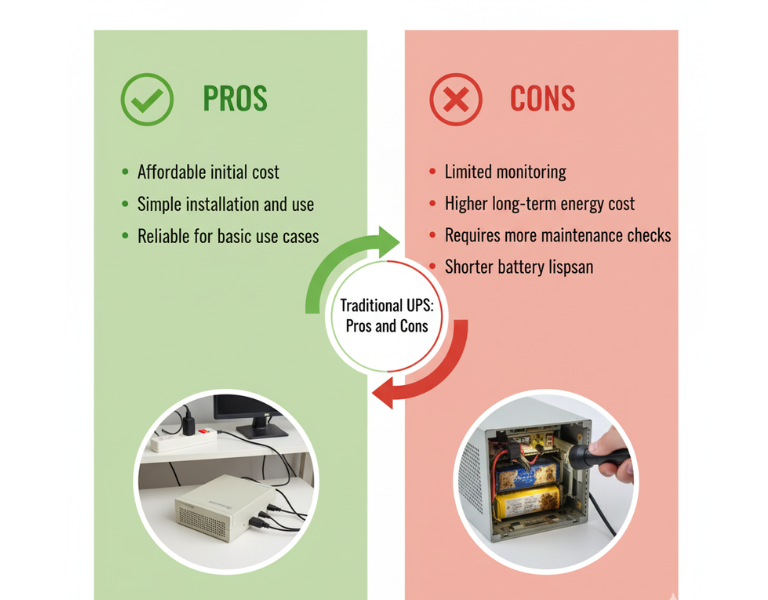
Traditional UPS systems are more straightforward, offering basic battery backup and surge protection. They?re typically more affordable upfront and may serve well for small businesses or environments with fewer critical systems. However, they lack the advanced monitoring capabilities and energy efficiency that come with APC Smart-UPS units. For many, this can mean more frequent maintenance checks, higher operational costs, and the risk of unexpected downtimes.


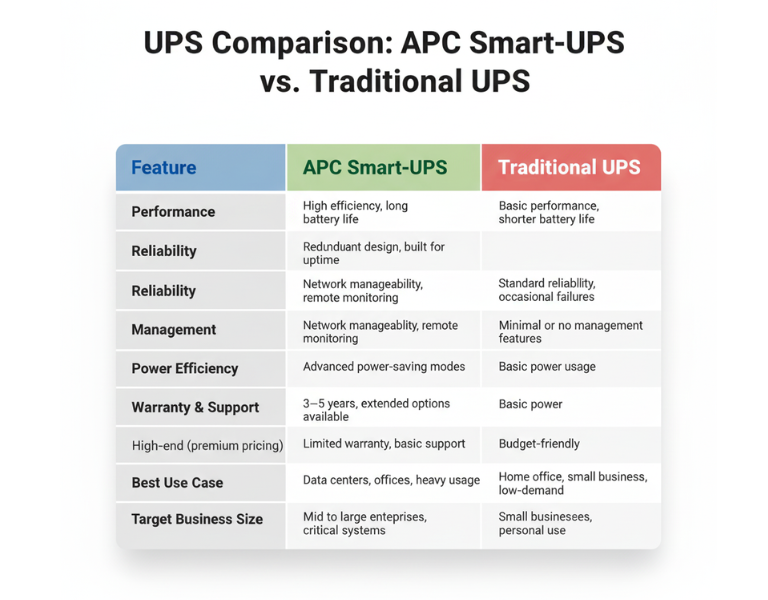
Comparison Table

Feature APC Smart-UPS Traditional UPS
Performance High efficiency, long battery life Basic performance, shorter battery life
Reliability Redundant design, built for uptime Standard reliability, occasional failures
Management Network manageability, remote monitoring Minimal or no management features
Power Efficiency Advanced power-saving modes Basic power usage
Warranty & Support 3?5 years, extended options available Limited warranty, basic support
Price Range High-end (premium pricing) Budget-friendly
Best Use Case Data centers, offices, heavy usage Home office, small business, low-demand
Target Business Size Mid to large enterprises, critical systems Small businesses, personal use

ÿ ÿ ÿ ÿ ÿ ÿ ÿ ÿ ÿ ÿ ÿ ÿ ÿ ÿ ÿ ÿ ÿ ÿ ÿ ÿ ÿ ÿ ÿ ÿ ÿ ÿ ÿ ÿ ÿÿ ÿ ÿ
Pros and Cons

APC Smart-UPS

Pros Cons
– Advanced network monitoring – Higher upfront cost
– Real-time health alerts – Requires setup and management
– Energy efficiency reduces costs – Overkill for small setups
– Longer battery life and proactive maintenance – More complex to install

Traditional UPS

Pros Cons
– Affordable initial cost – Limited monitoring
– Simple installation and use – Higher long-term energy cost
– Reliable for basic use cases – Requires more maintenance checks
– Basic surge protection – Shorter battery lifespan

Expert Recommendation

For small businesses or home offices with limited infrastructure, a traditional UPS might be the most cost-effective choice. They?re simple to use and reliable for lower-demand environments, offering essential power protection without unnecessary complexity. However, if your business involves critical systems or you need remote monitoring across multiple locations, investing in an APC Smart-UPS will provide you with greater visibility and long-term savings. The upfront cost is higher, but the benefits of energy efficiency and remote management often outweigh the additional investment in the long run.


Real-World Use Cases

  • Design Studio (Small Business): A small design studio with 10 employees uses a traditional UPS system to protect their file servers and workstations. Since they don?t experience frequent power outages, the basic protection and lower upfront cost are sufficient for their needs.

  • Corporate Data Center (Large Enterprise): A data center with hundreds of servers relies on APC Smart-UPS units for continuous uptime. These units are monitored remotely, ensuring that any battery degradation is addressed before it becomes an issue, minimizing downtime.

  • Retail Store (Small Business): A retail store with a point-of-sale system and inventory management needs basic power protection. A traditional UPS is ideal for their low-maintenance requirements, offering reliability without overinvesting in features they won?t use.

  • Regional Office (Enterprise): A regional office for a large enterprise has several remote workstations that rely on network connectivity. APC Smart-UPS units provide energy efficiency and reduce the need for on-site monitoring. Staff can check UPS health remotely, reducing unnecessary visits and service calls.


Final Summary

Choosing between APC Smart-UPS and traditional UPS systems depends largely on your business size and needs. While traditional UPS systems work well for small-scale operations, APC Smart-UPS systems provide advanced features that make them ideal for larger enterprises or critical environments where uptime and energy efficiency are a priority.

How to Choose the Right APC UPS for Your Data Center: A Step-by-Step Guide

Introduction:

When managing a data center, the reliability of your uninterruptible power supply (UPS) is crucial for keeping everything running smoothly. Without the right UPS, your equipment could face downtime during power outages, resulting in significant data loss or system failure. But with so many models and specifications out there, how do you choose the right APC UPS for your environment?

In this blog, we’ll walk through the key factors to consider when choosing a UPS. Whether you?re looking to support a small office or a large-scale data center, we?ll cover all the technical aspects so you can make an informed decision. This guide doesn?t push a specific model ? it?s about helping you choose the right APC UPS to meet your needs.


Brand Overview:

APC by Schneider Electric is a leading brand in the UPS industry, known for providing reliable, scalable, and energy-efficient solutions for businesses of all sizes. From small office environments to massive data centers, APC offers a range of UPS systems designed to keep critical systems up and running during power disturbances.


Key Factors to Consider When Choosing the Right APC UPS:

1. Power Capacity

  • Why it matters: The power capacity determines how much load the UPS can handle before it runs out of battery. Ensure the UPS can handle your equipment?s power requirements, including a buffer for future growth.

  • Tip: Always choose a UPS with a bit of extra capacity (20?30%) to accommodate additional devices or unforeseen power spikes.

2. Battery Runtime

  • Why it matters: How long will the UPS keep your systems running in the event of a power failure? Battery runtime is key for uninterrupted operation.

  • Tip: Be sure to consider the battery runtime required for your critical systems, as longer runtime typically comes with a higher cost.

3. Form Factor (Tower vs. Rack-Mounted)

  • Why it matters: The physical setup of your data center will dictate whether a tower or rack-mounted UPS is best for your space.

  • Tip: Rack-mounted UPS systems are ideal for space-efficient environments, while tower models might be better suited for smaller setups with minimal rack space.

4. Scalability

  • Why it matters: Your UPS should be able to scale as your data center grows. Look for models that allow you to add more batteries or modules as needed.

  • Tip: Choose a modular system for scalability, allowing you to expand without replacing the entire system.


Common Pitfalls to Avoid When Choosing a UPS:

  • Underestimating Power Needs: Ensure you calculate the total wattage of all devices connected to the UPS. Avoid buying a UPS with too little capacity, as it could fail to protect your critical systems.

  • Ignoring Future Growth: Consider your future power needs and choose a UPS with the ability to scale. An undersized UPS could result in system shutdowns or damaged hardware.

  • Not Considering Efficiency: Energy efficiency is important for long-term cost savings. Look for models with high efficiency to minimize energy costs and reduce your environmental footprint.


Comparison Table:

Feature APC Smart-UPS APC Back-UPS
Power Capacity 1 kVA to 20 kVA 400 VA to 1.5 kVA
Battery Runtime 10?40 minutes 5?20 minutes
Form Factor Rack & Tower Tower only
Scalability Modular, expandable Limited scalability
Efficiency High Efficiency Standard
Best Use Case Data Centers, Servers Small Office, Home Office
Target Business Size Enterprise, SMB Small Business

Pros and Cons (APC Smart-UPS vs. APC Back-UPS):

APC Smart-UPS

Pros:

  • High efficiency and energy savings

  • Scalable, with modular battery options

  • Ideal for data centers and enterprise environments

Cons:

  • Higher initial cost

  • Requires more space due to larger units

APC Back-UPS

Pros:

  • Affordable, great for small offices

  • Compact design

  • Reliable protection for low-power devices

Cons:

  • Limited scalability

  • Lower battery runtime compared to Smart-UPS


Expert Recommendation:

  • For small businesses or home offices: The APC Back-UPS is a great option. It’s affordable, compact, and provides reliable power protection for basic needs.

  • For data centers or larger enterprise environments: The APC Smart-UPS is the better choice due to its higher capacity, scalability, and efficiency. It?s an investment that will pay off by ensuring uptime and minimizing energy costs in the long run.


Real-World Use Cases:

  • Small Office (10?20 employees): The APC Back-UPS 800VA provides essential backup power to protect servers, computers, and networking equipment, ensuring productivity during short power outages.

  • Data Center (100+ devices): An APC Smart-UPS 10kVA with extended battery runtime would support mission-critical servers and networking equipment, keeping everything operational during longer power disruptions.


Final Summary:

When choosing the right APC UPS for your data center, focus on capacity, scalability, and battery runtime. Consider the future growth of your infrastructure and the specific needs of your organization. Whether you need a small office solution or enterprise-level protection, APC has a range of products designed to meet your needs.