Where to Buy APC Smart-UPS in 2026 (A Practical Buyers Guide)

Power reliability is no longer optional. Whether you?re running a small server room, a growing IT environment, or a home lab that actually matters, APC Smart-UPS systems remain one of the safest choices in 2026. The bigger question today is not which APC Smart-UPS to buy, but where to buy it from without overpaying or risking warranty issues.

This guide breaks it down clearly, based on how businesses actually buy APC equipment today.


Why APC Smart-UPS Still Makes Sense in 2026

APC Smart-UPS models continue to be widely used for one simple reason: they are designed for real workloads, not just power backup on paper.

What matters most in 2026:

  • Stable sine-wave output for modern power supplies

  • Predictable battery runtime under load

  • Network management and monitoring support

  • Long-term firmware and warranty backing

Smart-UPS models are built for servers, storage, network gear, and business-critical systems. They are not designed to power high-draw desktops or gaming rigs, and understanding that distinction avoids a lot of buyer regret.


The Real Risk When Buying APC Smart-UPS Online

Most issues buyers face are not product related. They come from the source.

Common problems seen in the market:

  • Refurbished units sold as new

  • Grey-market imports with no manufacturer support

  • Missing accessories or incorrect SKUs

  • No help when battery or firmware issues arise

In 2026, warranty validation and firmware access still depend heavily on buying through proper channels. This is why the seller matters almost as much as the UPS itself.


Where Businesses Actually Buy APC Smart-UPS

There are three main options buyers consider today:

1. Large Marketplaces

These can be convenient, but listings are often mixed between new, open-box, and refurbished inventory. Verifying authorization and warranty coverage usually takes extra effort.

2. Direct Manufacturer Channels

Good for large enterprise contracts, but not always ideal for SMBs due to pricing, lead times, or limited stock flexibility.

3. Specialized IT & Power Equipment Resellers

This is where most SMBs and IT teams land in 2026. Authorized resellers that focus on power, racks, and infrastructure usually provide better SKU accuracy, faster fulfillment, and clearer warranty handling.

This is also where buyers often find more competitive pricing, especially on Smart-UPS models that move in volume.


What to Look for in a Trusted APC Smart-UPS Seller

Before placing an order, experienced buyers usually check for:

  • Clear confirmation of new, factory-sealed units

  • Authorization status for APC products

  • Accurate product pages with correct part numbers

  • Real stock visibility, not just backorder listings

  • Support that understands power sizing and load planning

Vendors that work daily with UPS, PDUs, and rack equipment tend to avoid the common mistakes that general retailers make.


Pricing and Service Expectations in 2026

APC pricing is more stable than it was a few years ago, but discounts still exist if you know where to look. Authorized resellers often run competitive pricing due to volume purchasing and direct distribution access.

Fast shipping also matters more than ever. Many buyers are replacing aging UPS units under time pressure, not planning months in advance.

This is where suppliers like DC Supplies are often chosen, as they combine authorized sourcing with discounted pricing and faster order handling for business customers, without the friction seen on large marketplaces.


Choosing the Right Smart-UPS Before You Buy

A quick reality check many buyers miss:

  • Do not size a UPS for peak desktop or workstation draw

  • Separate high-draw equipment from critical network gear

  • Focus on runtime at real load, not just VA rating

  • Rack depth and outlet type matter more than people expect

Buying the right model once is cheaper than replacing the wrong one later.


Final Thoughts

In 2026, APC Smart-UPS remains a solid, low-risk investment for protecting business-critical systems. The key is buying from a source that understands APC equipment, offers genuine products, and backs them with proper support.

Avoid rushing into the cheapest listing you see. Focus on authorization, accuracy, and service. That decision usually pays for itself the first time you actually need your UPS to do its job.
Eaton UPS Sizing Guide: How to Choose the Right Capacity for Your Office or Server Room

Introduction

UPS sizing gets confusing quickly. Maybe you?ve added a few new servers, your PoE switches are running hotter than usual, or a brief outage last week dropped your VoIP phones and access points. The problem is simple: most offices and IT rooms either oversize a UPS and overspend, or undersize it and get no meaningful runtime. This guide walks you through picking the right Eaton UPS capacity based on real loads, real power factors, and real business requirements ? not theoretical lab specs.


EatonÿOverview

Eaton is known for reliable electrical protection, strong power management software, and UPS models that maintain stable output under mixed IT loads. Their units generally provide better voltage regulation and scalability compared to many entry-level alternatives. Eaton?s line also covers a wide range ? from compact line-interactive units for workstations to fully scalable double-conversion systems for server rooms and small data centers.


Eaton UPS Sizing Comparison

(Example capacities commonly evaluated for offices & small server rooms)

Criteria Eaton 1500VA (Line-Interactive) Eaton 3000VA (Online Double-Conversion)
Performance Good for desktops/edge gear High stability for servers & storage
Reliability Moderate, AVR-supported Very high, consistent output
Management USB/Network Card optional Full network management, advanced logs
Power Efficiency Higher efficiency Lower efficiency but superior protection
Warranty & Support Standard coverage Extended options available
Price Range Low?mid Mid?high
Best Use Case Small office equipment Server rooms, VoIP, switches, storage
Target Business Size 1?20 users 20?100+ users

Pros and Cons of EatonÿUPS Options

Eaton 1500VA (Line interactive UPS)

Pros

  • Lower cost and simple installation

  • Good for workstations, small switches, APs

  • Generally quieter operation

  • Higher efficiency

  • Smaller footprint

Cons

  • Limited runtime on heavier loads

  • Not ideal for servers or virtualized environments

  • Less precise voltage conditioning

Eaton 3000VA (Double Conversation Online UPS)

Pros

  • Stable, clean power regardless of input fluctuations

  • Ideal for rack servers, storage, VoIP, and critical switches

  • Supports network management cards

  • Better handling of sudden load spikes

  • Optional extended battery modules

Cons

  • Higher cost

  • Generates more heat

  • Requires more rack depth and ventilation


Expert Recommendation

If you?re protecting desktops, light PoE switches, or general office equipment, a 1500VA unit is typically enough ? especially when loads sit below 600?800W. But if you?re running hypervisors, storage arrays, or anything that needs clean and predictable power, the 3000VA class gives you the reliability and runtime you actually need. For mixed Cisco/HP switching, VoIP, and one or two servers, a 2200?3000VA online UPS usually hits the sweet spot. Avoid oversizing unless you’re planning hardware growth within 12?18 months.


Real-World Use Cases

Design Studio (20?25 users):
One virtualization host running file storage and two managed switches. A 2200?3000VA unit provides enough headroom for short outages and clean shutdowns.

Small Office (10?15 users):
PoE switch powering phones and APs, plus a firewall. A 1500VA line-interactive model can support 10?15 minutes of runtime.

Server Room (40?60 users):
Two stacked switches, VoIP, and multiple VMs. A 3000VA double-conversion UPS with optional expansion batteries ensures stable runtime and proper failover.


Final Summary

Choosing the right Eaton UPS comes down to watts, power factor, and how long your systems must stay online during an outage. Line-interactive fits light office loads, while double-conversion protects critical servers and network infrastructure. Size for your real load, not the label rating, and leave room for growth.

Upgrade your power protection with Eaton UPS solutions, backed by expert guidance from DC Supplies. Whether you?re equipping a small office or securing an entire server room, we help you size the right unit, avoid over-spending, and ensure your network stays online when it matters. Get dependable performance, fast availability, and professional support tailored to your environment. Reach out toÿDC Supplies to choose the right Eaton UPS for your business.

Why APC Line-Interactive UPS is a Game Changer for Your Business

Introduction

In today?s business world, power interruptions can cause significant disruptions, resulting in lost productivity and potential damage to equipment. Whether you’re running servers, network equipment, or even a small office, reliable power protection is crucial.

The APC Line-Interactive UPS (Uninterruptible Power Supply) offers a practical, cost-effective solution for businesses of all sizes. Unlike basic surge protectors, it provides both surge protection and battery backup, ensuring your equipment stays operational during power outages and voltage fluctuations.

This blog explains why an APC Line-Interactive UPS can be a game changer for your business, offering a reliable, affordable solution to prevent downtime and protect your valuable IT assets.


What is an APC Line-Interactive UPS?

An APC Line-Interactive UPS is a power protection system that not only provides backup power during outages but also offers voltage regulation for minor power fluctuations. It works by automatically adjusting for slight variations in incoming power, saving your equipment from potential damage without immediately relying on the battery.

Key features include:

  • Automatic Voltage Regulation (AVR): Keeps the voltage stable, preventing equipment damage from voltage dips or surges.

  • Pure Sine-Wave Output: Provides clean, stable power to sensitive equipment, such as servers and networking devices.

  • SmartConnect: Enables cloud-based monitoring, providing real-time alerts and system status remotely.


Key Benefits of APC Line-Interactive UPS for Your Business

  1. Reliable Power Protection
    APC Line-Interactive UPS systems protect against power disruptions, such as blackouts, brownouts, and voltage spikes, ensuring your business stays operational.

  2. Cost-Effective Solution
    APC?s UPS systems offer excellent protection at a lower cost compared to more complex online UPS systems, making them ideal for small and medium-sized businesses.

  3. Energy Efficiency
    Designed to optimize energy use, these UPS systems provide the necessary power with minimal waste, helping reduce your business?s energy consumption and cost.

  4. Remote Monitoring
    With SmartConnect, you can monitor your UPS remotely, receive alerts, and track system health without needing physical access to the device.

  5. Scalability
    APC?s UPS systems are scalable, meaning you can easily add additional units as your business grows, ensuring long-term protection without major upgrades.


APC Line-Interactive UPS: Ideal for Small to Medium-Sized Businesses

The APC Line-Interactive UPS is a perfect fit for businesses that:

  • Require reliable protection for IT equipment such as servers, routers, and POS systems.

  • Need an affordable yet dependable solution for power backup.

  • Operate in areas with moderate power quality issues, such as occasional surges and sags.

  • Seek easy-to-manage, remote-monitoring features without extensive infrastructure needs.


Comparison Table: APC Line-Interactive UPS Models

Feature APC Smart-UPS 1000VA APC Smart-UPS 1500VA APC Smart-UPS 2200VA
Performance 1000VA / 600W 1500VA / 900W 2200VA / 1320W
Voltage Regulation Automatic Voltage Regulation (AVR) AVR AVR
Power Efficiency High High High
Pure Sine-Wave Output Yes Yes Yes
Warranty & Support 3 years 3 years 3 years
Remote Monitoring SmartConnect SmartConnect SmartConnect
Price Range $450?$550 $650?$750 $1,100?$1,300
Best Use Case Small office or home office Small to medium-sized business Medium-sized business or rack setups
Target Business Size Up to 15 users 15?30 users 30+ users

Pros and Cons of APC Line-Interactive UPS

APC Smart-UPS 1000VA

Pros:

  • Cost-effective for small office use.

  • Provides essential surge protection and backup power.

  • Pure sine-wave output for sensitive devices.

Cons:

  • Limited to smaller setups (under 15 users).

  • Shorter runtime under full load compared to higher-capacity models.

APC Smart-UPS 1500VA

Pros:

  • Ideal for medium-sized businesses or server rooms.

  • Good power capacity and longer battery runtime.

  • Reliable AVR for consistent voltage regulation.

Cons:

  • Higher initial cost than the 1000VA model.

  • Slightly bulkier than smaller models.

APC Smart-UPS 2200VA

Pros:

  • Excellent for businesses with heavier IT equipment.

  • Longer runtime under load, suitable for multiple servers.

  • Strong reliability with high-capacity power.

Cons:

  • Larger footprint and higher price point.

  • May be overkill for small offices or light loads.


Expert Recommendation: Is APC Line-Interactive UPS Right for Your Business?

For small to medium-sized businesses, the APC Smart-UPS 1500VA provides the best balance of cost, capacity, and features. It offers strong protection for servers and network devices, making it ideal for businesses looking for affordable yet reliable power backup.

If you?re operating a small office with minimal IT infrastructure, the 1000VA model may be sufficient. However, for larger operations with multiple devices, the 2200VA model will provide ample capacity and ensure the longevity of your equipment, particularly if you?re dealing with more sensitive or high-demand setups.


Real-World Use Cases for APC Line-Interactive UPS

  1. Small Design Studio (10-15 users)
    A design studio with a few high-powered workstations benefits from the APC Smart-UPS 1000VA, providing surge protection and backup power during outages to prevent data loss and keep the creative process uninterrupted.

  2. Growing Office with Multiple Servers (20-30 users)
    A marketing company with multiple servers, network switches, and workstations would rely on the APC Smart-UPS 1500VA, offering robust backup power, energy efficiency, and seamless monitoring through SmartConnect.

  3. Larger Office Setup (30+ users, multiple racks)
    A tech company with a small data center would use the APC Smart-UPS 2200VA, ensuring that multiple servers, routers, and storage systems remain operational during power disruptions, with enough capacity to handle the growing IT demands.


Conclusion: Keep Your Business Running with APC Line-Interactive UPS

APC Line-Interactive UPS systems provide small and medium-sized businesses with affordable, reliable, and efficient power protection. With features like AVR, remote monitoring, and pure sine-wave output, APC ensures that your business operations remain uninterrupted, even during power fluctuations. Whether you?re a growing office or managing a network of critical devices, APC?s Line-Interactive UPS models offer a smart investment in power security.

APC Smart-UPS vs. Traditional UPS: Which One Should You Choose?

Introduction

Choosing the right Uninterruptible Power Supply (UPS) is crucial for keeping your critical systems online during power outages. If you’re considering options, you’re likely debating between APC?s Smart-UPS line and traditional UPS systems. The decision impacts your performance, energy consumption, maintenance costs, and overall reliability. In this blog, we?ll compare these two types of UPS systems, focusing on their advanced features like remote monitoring, energy efficiency, and cost-effectiveness. By the end, you’ll have the information to choose the best UPS for your business?whether you?re a small office or a large enterprise.

ÿ ÿ ÿ ÿ ÿ ÿ ÿ ÿ ÿ ÿ ÿ ÿ ÿ ÿ ÿ ÿ ÿ ÿ ÿ ÿ ÿ ÿ ÿ ÿ ÿ ÿ ÿ ÿ ÿ ÿÿ ÿ


APC Smart-UPS Overview

APC Smart-UPS line is designed for high performance, providing excellent power protection with advanced features such as network manageability, remote monitoring, and energy efficiency. This line is perfect for businesses of all sizes, especially those looking for detailed control and long-term savings. APC Smart-UPS is built for users who need consistent uptime and minimal disruption, with cloud connectivity that allows IT managers to monitor UPS health and status remotely.

Traditional UPS Overview

Traditional UPS systems are more straightforward, offering basic battery backup and surge protection. They?re typically more affordable upfront and may serve well for small businesses or environments with fewer critical systems. However, they lack the advanced monitoring capabilities and energy efficiency that come with APC Smart-UPS units. For many, this can mean more frequent maintenance checks, higher operational costs, and the risk of unexpected downtimes.


Comparison Table

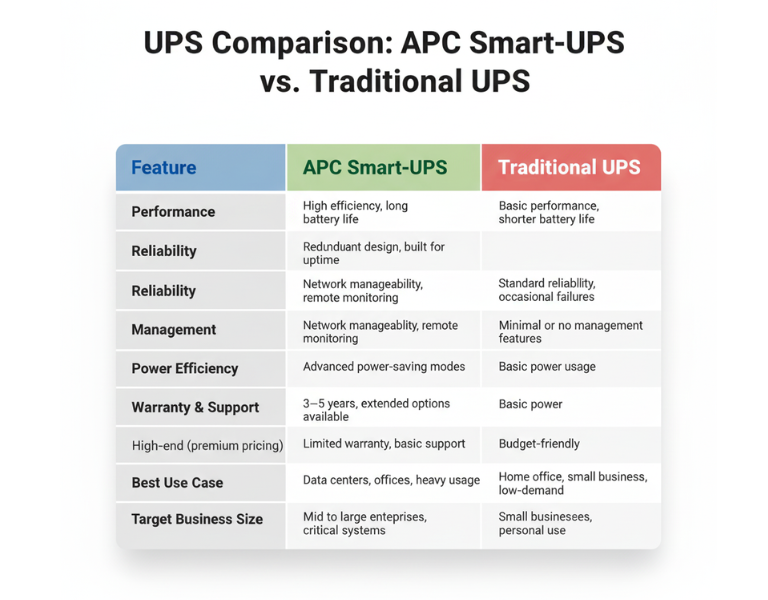
Feature APC Smart-UPS Traditional UPS
Performance High efficiency, long battery life Basic performance, shorter battery life
Reliability Redundant design, built for uptime Standard reliability, occasional failures
Management Network manageability, remote monitoring Minimal or no management features
Power Efficiency Advanced power-saving modes Basic power usage
Warranty & Support 3?5 years, extended options available Limited warranty, basic support
Price Range High-end (premium pricing) Budget-friendly
Best Use Case Data centers, offices, heavy usage Home office, small business, low-demand
Target Business Size Mid to large enterprises, critical systems Small businesses, personal use

ÿ ÿ ÿ ÿ ÿ ÿ ÿ ÿ ÿ ÿ ÿ ÿ ÿ ÿ ÿ ÿ ÿ ÿ ÿ ÿ ÿ ÿ ÿ ÿ ÿ ÿ ÿ ÿ ÿÿ ÿ ÿ
Pros and Cons

APC Smart-UPS

Pros Cons
– Advanced network monitoring – Higher upfront cost
– Real-time health alerts – Requires setup and management
– Energy efficiency reduces costs – Overkill for small setups
– Longer battery life and proactive maintenance – More complex to install

Traditional UPS

Pros Cons
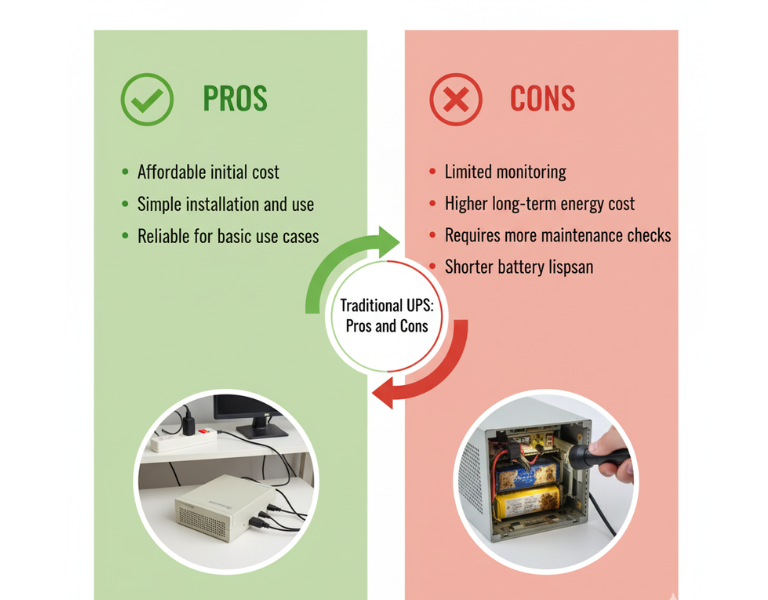
– Affordable initial cost – Limited monitoring
– Simple installation and use – Higher long-term energy cost
– Reliable for basic use cases – Requires more maintenance checks
– Basic surge protection – Shorter battery lifespan

Expert Recommendation

For small businesses or home offices with limited infrastructure, a traditional UPS might be the most cost-effective choice. They?re simple to use and reliable for lower-demand environments, offering essential power protection without unnecessary complexity. However, if your business involves critical systems or you need remote monitoring across multiple locations, investing in an APC Smart-UPS will provide you with greater visibility and long-term savings. The upfront cost is higher, but the benefits of energy efficiency and remote management often outweigh the additional investment in the long run.


Real-World Use Cases

  • Design Studio (Small Business): A small design studio with 10 employees uses a traditional UPS system to protect their file servers and workstations. Since they don?t experience frequent power outages, the basic protection and lower upfront cost are sufficient for their needs.

  • Corporate Data Center (Large Enterprise): A data center with hundreds of servers relies on APC Smart-UPS units for continuous uptime. These units are monitored remotely, ensuring that any battery degradation is addressed before it becomes an issue, minimizing downtime.

  • Retail Store (Small Business): A retail store with a point-of-sale system and inventory management needs basic power protection. A traditional UPS is ideal for their low-maintenance requirements, offering reliability without overinvesting in features they won?t use.

  • Regional Office (Enterprise): A regional office for a large enterprise has several remote workstations that rely on network connectivity. APC Smart-UPS units provide energy efficiency and reduce the need for on-site monitoring. Staff can check UPS health remotely, reducing unnecessary visits and service calls.


Final Summary

Choosing between APC Smart-UPS and traditional UPS systems depends largely on your business size and needs. While traditional UPS systems work well for small-scale operations, APC Smart-UPS systems provide advanced features that make them ideal for larger enterprises or critical environments where uptime and energy efficiency are a priority.