APC Smart-UPS Review 2026: Still the Gold Standard for Business Power Protection?

Power problems don?t announce themselves. One voltage dip, one unexpected outage, and suddenly your servers reboot, databases corrupt, or critical network equipment goes offline. In 2026, with businesses relying more than ever on always-on infrastructure, a reliable UPS is not optional ? it?s insurance.

APC Smart-UPS has been a long-standing name in this space. But the real question is: does APC Smart-UPS still make sense in 2026, especially when cheaper alternatives are flooding the market?

This review breaks it down honestly ? performance, reliability, value, and where APC Smart-UPS truly shines (and where it doesn?t).


What Is APC Smart-UPS (and Who Is It Really For)?

APC Smart-UPS is designed primarily for:

  • Small to mid-size businesses

  • Data centers & server rooms

  • Network closets

  • Healthcare, finance, and retail IT environments

  • Mission-critical office infrastructure

This is not a consumer UPS. It?s built for environments where uptime matters more than saving a few dollars.

If your business runs:

  • Servers

  • Network switches

  • Firewalls

  • Storage systems

  • POS or medical systems

APC Smart-UPS is aimed squarely at you.


Key Strengths of APC Smart-UPS in 2026

1. Power Quality & Voltage Regulation

APC Smart-UPS units use line-interactive technology with AVR (Automatic Voltage Regulation). This means they correct voltage fluctuations without switching to battery, which:

  • Extends battery life

  • Protects sensitive electronics

  • Handles unstable power grids well

In real-world use, this matters far more than just backup runtime.


2. Battery Reliability (Still a Major Advantage)

Battery failures are the #1 cause of UPS downtime.

APC?s battery management remains one of the best in the industry:

  • Predictable battery replacement cycles

  • Clear battery health alerts

  • Widely available replacement batteries

In 2026, many low-cost UPS brands still struggle here.


3. Smart Monitoring & Remote Management

Modern APC Smart-UPS models support:

  • LCD status displays

  • USB / Network monitoring

  • APC SmartConnect (cloud monitoring on select models)

For IT teams managing multiple locations, this visibility saves time and prevents surprises.


4. Rackmount & Tower Flexibility

APC Smart-UPS is available in:

  • Tower models for offices

  • 2U / rackmount models for server racks

This flexibility makes it easy to standardize power protection across different environments.


Performance: Real-World Expectations (No Marketing Talk)

Let?s be realistic.

APC Smart-UPS is not meant to run your servers for hours. Its purpose is to:

  • Provide clean, stable power

  • Bridge short outages

  • Allow safe shutdown during long outages

Typical real-world performance:

  • 5?15 minutes runtime under moderate load

  • Enough time for generator startup or graceful shutdown

That?s exactly what a business-grade UPS should do.


What APC Smart-UPS Is NOT

This is important.

APC Smart-UPS is not ideal if:

  • You want the cheapest possible option

  • You only need backup for a home PC

  • You expect hours of runtime without external batteries

You?re paying for reliability, support, and consistency, not gimmicks.


APC Smart-UPS vs Cheaper Alternatives (2026 Reality Check)

Factor APC Smart-UPS Budget UPS Brands
Build Quality Enterprise-grade Consumer-grade
Voltage Regulation Excellent Limited / None
Battery Predictability High Inconsistent
Monitoring Advanced Basic
Long-Term Cost Lower Often higher (failures)

Many businesses switch to APC after experiencing failures with cheaper units. That pattern hasn?t changed in 2026.


Where to Buy APC Smart-UPS (This Actually Matters)

UPS products are often mishandled, improperly stored, or sold without proper support when bought from unreliable sources.

Working with a specialized IT hardware supplier makes a difference.

Companies like DC Suppliesÿfocus specifically on enterprise IT equipment, offering:

  • Genuine APC Smart-UPS units

  • Business-oriented pricing

  • Proper product handling

  • Support for B2B buyers

For businesses, this reduces risk compared to random marketplace sellers.


Final Verdict: Is APC Smart-UPS Worth It in 2026?

Yes ? if uptime matters to your business.

APC Smart-UPS remains one of the safest choices for:

  • SMBs

  • Growing IT environments

  • Mission-critical systems

It?s not the cheapest. It?s not flashy.
But it does what a UPS should do: protect your infrastructure without surprises.

In a world where downtime is more expensive than ever, that reliability still justifies the investment.
Buying APC Smart UPS Online From a Trusted Source in 2026

Introduction

When a server shuts down unexpectedly or network equipment gets damaged during a power event, the cost is almost always higher than the cost of proper power protection. That is why APC Smart UPS systems are widely used across data centers, server rooms, healthcare facilities, and enterprise IT environments.

In 2026, many businesses prefer buying APC Smart UPS online for speed and convenience. The challenge is not finding a product, but finding a trusted source that delivers the correct model, valid warranty, and dependable service.

This guide explains how to choose the right APC Smart UPS and why buying from a reliable reseller is just as important as the UPS itself.


Why APC Smart UPS Is Used in Business Environments

APC Smart UPS is designed for business critical equipment, not home electronics.

Common deployments include:

  • Servers and storage systems

  • Network switches, routers, and firewalls

  • VoIP and communication systems

  • Medical and industrial IT equipment

Businesses rely on APC Smart UPS because of:

  • Pure sine wave output suitable for sensitive hardware

  • Predictable battery performance

  • Long product lifecycle and support availability

  • Clear documentation and model consistency

For IT teams, reliability and predictability matter more than extra features.


What to Check Before Buying APC Smart UPS Online

Before placing an order, buyers should confirm a few technical basics.

  • Total power load and required capacity

  • Runtime needed for shutdown or continued operation

  • Rack mount or tower form factor

  • Monitoring and management requirements

  • Battery replacement availability

Skipping these steps often leads to oversizing, undersizing, or ordering the wrong model.


Why the Source You Buy From Matters

Not all online sellers operate the same way. Buying from an unreliable source can lead to delays, missing accessories, or unsupported hardware.

Below is a simple Excel-style comparison showing why the source matters.

Why Buy APC Smart UPS From a Trusted Reseller

Factor Trusted Reseller Unverified Online Seller
Product authenticity Verified APC products Unclear sourcing
Warranty Manufacturer supported Often limited or unclear
Model accuracy Correct configuration guidance High risk of mismatch
Inventory status Confirmed before shipping Stock often not verified
Delivery timelines Predictable and reliable Delays common
Technical support Knowledgeable assistance Minimal or none

This difference directly impacts deployment time and operational risk.


Buying APC Smart UPS From DC Supplies

DC Supplies supports businesses that rely on APC Smart UPS for critical infrastructure. As an authorized reseller, the focus is on accuracy, verified inventory, and dependable fulfillment.

Customers choose DC Supplies because:

  • Models are matched to real power requirements

  • Inventory is confirmed before order processing

  • Pricing is competitive without being misleading

  • Orders are handled with business timelines in mind

The goal is to make sure the UPS you receive is ready to deploy, not returned or replaced.


When Buying APC Smart UPS Online Makes Sense

Buying online works well when:

  • Power requirements are already defined

  • Deployment timelines are tight

  • The reseller provides technical clarity

It may not be ideal when:

  • Load calculations are unclear

  • Extended runtime solutions are required

  • Large-scale deployments need design input

In those cases, guidance before ordering saves time and cost.


Practical Recommendation

If your environment includes servers, networking gear, or critical applications, APC Smart UPS remains a dependable choice in 2026. The key decision is not only which UPS model to buy, but also where to buy it from.

A trusted reseller reduces risk, shortens deployment time, and helps ensure long-term support.


Final Summary

APC Smart UPS is a proven solution for business power protection. Buying it online is convenient, but only when the source is reliable. Choosing a trusted reseller helps ensure correct configuration, valid warranty, and on-time delivery.

That combination matters more than saving a few dollars upfront.

Eaton vs APC: Which UPS Brand Makes More Sense for Your Business?

Introduction

Most businesses only look at UPS capacity and price, but the real differences show up during voltage swings, unexpected outages, or when a battery fails at the wrong time. Eaton and APC are the two most common UPS brands you?ll see in server rooms, branches, and network closets, but they?re optimized for slightly different priorities. This guide breaks down how each behaves in real environments so you can choose the unit that fits your workload, not someone?s sales pitch.

Brand Overview

Eaton focuses on electrical performance, high-efficiency designs, and strong power conditioning. Their line-interactive and online units are popular in SMB and mid-market deployments because of reliability, long battery life, and solid monitoring options.

APC is known for broad product availability, simple deployment, and user-friendly management. They dominate office and branch environments and offer a wide range of capacities with predictable performance and long-standing industry trust.

Comparison Table

Category Eaton APC
Performance Strong AVR, high efficiency, robust internal components Stable output, wide model range, consistent runtime
Reliability Strong power conditioning, long battery lifespan Proven track record, dependable for mixed workloads
Management Advanced monitoring, hot-swap options Easy-to-use tools, broad ecosystem support
Power Efficiency Typically higher efficiency ratings Good efficiency across most lines
Warranty & Support 2?3 years depending on model 2?3 years depending on model
Price Range Generally mid-range Mid-to-high depending on series
Best Use Case Servers, storage, network racks Offices, branches, mixed IT environments
Target Business Size SMB?Mid-Market Micro?Enterprise

Pros and Cons

Eaton

Pros

  • Strong voltage regulation and efficiency

  • Long-lasting batteries on many models

  • Good fit for virtualization hosts and NAS units

  • Hot-swap support on higher-tier units

Cons

  • Some models cost slightly more

  • Interface can be more technical

  • Fewer low-end units compared to APC

APC

Pros

  • Wide product selection

  • Simple deployment and management

  • Strong ecosystem compatibility

  • Good value for general office loads

Cons

  • Some models run warmer

  • Batteries may need replacement sooner

  • Certain features locked behind accessories

Expert Recommendation

If your environment runs servers, storage appliances, or anything sensitive to voltage fluctuations, Eaton generally provides better electrical performance and efficiency. For offices with mixed devices, branch setups, or locations where simplicity and wide availability matter, APC often fits better.
If your workload is mostly network gear and light compute, either brand works?pick based on price and size. For heavier VM or NAS workloads, Eaton usually offers stronger long-term value.

Real-World Use Cases

1. Small Office with Switches and ISP Gear
APC is usually the easier drop-in option with predictable runtime and simple management.

2. SMB Server Room Running ESXi or Hyper-V
Eaton?s stronger AVR and efficiency help stabilize heavier loads.

3. Distributed Retail Branches
APC fits well where easy replacements and broad availability matter.

Final Summary

Both Eaton and APC deliver solid protection, but they?re optimized for different needs. Eaton leans toward performance and efficiency, while APC excels in simplicity and broad availability. Choose based on workload sensitivity, runtime expectations, and the level of monitoring your environment requires.

Need help choosing the right UPS for your network, server room, or edge workload? DC Supplies can match Eaton and APC models to your exact power requirements, runtime needs, and budget. Whether you?re protecting a single switch or a full rack, we?ll help size the right unit and ensure you get reliable, long-term protection without overspending. Reach out to DC Supplies for tailored recommendations and fast procurement.

Best Practices for Power Management in IT Infrastructure

Introduction

Managing power in an IT environment is more than just plugging in servers and hoping for the best. Data centers and enterprise networks consume significant energy, and inefficient power management can lead to higher costs, downtime, and hardware stress. IT managers and procurement officers need to plan carefully to ensure that every watt counts. This blog explains proven strategies for managing power in IT infrastructure, helping teams optimize energy efficiency, balance loads, and avoid overloading circuits. It focuses on actionable practices rather than marketing claims and shows how APC solutions like Smart-UPS units and PDUs fit into a comprehensive power management strategy.


Why Power Management Matters

Poorly managed power can reduce hardware lifespan, increase energy bills, and create risks of unexpected outages. Effective power management allows for:

  • Stable operations under peak loads

  • Longer equipment life through controlled power delivery

  • Reduced cooling requirements via energy efficiency

  • Better capacity planning and load forecasting


Key Best Practices

1. Monitor and Measure Power Usage

Install metered PDUs and UPS units that provide real-time monitoring. Knowing the actual consumption per rack, device, or server cluster is critical for planning expansions and avoiding overloads.

2. Implement Load Balancing

Distribute servers and devices across circuits evenly. Avoid concentrating high-draw equipment on a single PDU or UPS branch to prevent tripping breakers or creating hot spots.

3. Use High-Efficiency UPS Systems

Deploy UPS units like APC Smart-UPS with high efficiency ratings. These units minimize energy loss during conversion and provide battery backup for short-term outages, ensuring uptime while saving on electricity.

4. Consolidate and Virtualize Servers

Fewer physical servers reduce overall power draw. Virtualization not only optimizes resource use but also lowers cooling requirements, which can account for a significant portion of data center energy consumption.

5. Schedule Maintenance and Firmware Updates

Firmware updates for UPS units and intelligent PDUs often include power optimization features. Regular maintenance prevents drift in power readings and ensures all devices operate efficiently.

6. Prioritize Tiered Power Protection

Not all equipment requires the same level of backup. Identify critical servers that need continuous uptime and protect them with robust UPS systems, while less critical devices can use lower-tier solutions, optimizing energy usage and cost.

7. Optimize Cooling in Parallel with Power

Power and cooling are interconnected. Efficient power management reduces heat generation, allowing for more effective cooling strategies like hot-aisle containment, airflow optimization, and dynamic fan control.


HowÿAPC Fits Into the Strategy

APC offers a range of devices that integrate monitoring, control, and backup into a single platform. Key solutions include:

  • Smart-UPS: Provides real-time load monitoring, high-efficiency power conversion, and battery backup. Ideal for critical servers and network equipment.

  • Intelligent PDUs: Allow per-outlet monitoring, remote power cycling, and load balancing at the rack level. Useful for large deployments where precise control is needed.

  • Management Software: APC?s PowerChute and similar software tools enable centralized reporting, alerts, and predictive capacity planning.

By combining UPS units, intelligent PDUs, and monitoring software, IT teams can maintain uptime, reduce energy waste, and plan future expansions more accurately.


Real-World Examples

  • Small Office Data Room (20 servers): Installing metered PDUs and a single Smart-UPS unit enabled real-time monitoring, preventing overloading during peak hours. Energy use dropped by 15% in three months.

  • Enterprise Campus (500+ servers): Layered UPS and PDU deployment with centralized management allowed the IT team to balance loads across racks dynamically, avoiding breaker trips during high compute workloads.

  • Cloud Hosting Environment: Virtualization combined with high-efficiency UPS units reduced physical server count by 40%, significantly lowering cooling and power costs.


Final Summary

Effective power management in IT infrastructure requires monitoring, balancing, and optimizing energy use. By deploying high-efficiency UPS systems, intelligent PDUs, and following structured best practices, organizations can reduce costs, prevent outages, and extend hardware life. APC solutions provide the tools to implement these strategies efficiently and reliably.

Smart-UPS vs Traditional UPS: Which APC System Fits Your Setup?

Introduction

When you?re planning power protection for servers, switches, or even a simple office setup, the type of UPS you pick matters more than most people expect. You might be deciding between APC?s Smart-UPS line and a basic traditional UPS, and on paper they both ?provide backup power,? but the real-world experience is drastically different. The right UPS affects uptime, remote manageability, battery longevity, operating cost, and even cooling requirements. This guide breaks down the differences in plain language so you can make the right choice for your network size, budget, and operational needs.

Brand Overview

APC?s Smart-UPS series is designed for professional environments where uptime and equipment protection matter ? server rooms, network closets, branch offices, and data centers. They provide clean output, advanced battery management, and options for remote monitoring.

Traditional UPS units ? including basic standby or simple line-interactive models are built for entry-level use. They protect desktops, small routers, and basic office electronics. They?re affordable but limited in monitoring, efficiency, and long-term reliability.

Comparison Table

Category APC Smart-UPS Traditional UPS
Performance Pure sine wave, voltage regulation, stable under variable load Basic output, often simulated sine wave
Reliability Advanced battery management, consistent runtime, hot-swappable options Limited diagnostics, shorter battery life
Remote Monitoring SmartConnect, SNMP, network cards, email alerts, logs Minimal or none; local indicators only
Energy Efficiency High-efficiency modes reduce heat and power use Lower efficiency; higher long-term operating cost
Cost-Effectiveness Higher upfront cost but reduced downtime and lower energy waste Very low cost but limited protections
Scalability Broad capacity range, optional external battery packs Fixed capacity; not built for growth
Best Use Case Servers, switches, storage, VoIP, multi-site deployments Desktops, POS terminals, light office gear
Business Size Small business to enterprise Home office to small office

Pros and Cons

APCÿSmart-UPS

Pros:

  • Provides clean, regulated output ideal for servers and sensitive hardware

  • Remote monitoring allows proactive maintenance

  • Intelligent charging extends battery lifespan

  • High efficiency lowers heat and electricity usage

  • Wide range of sizes and runtime options

Cons:

  • Higher initial cost

  • More configuration required for network management

  • Sometimes more capacity than small offices truly need

TraditionalÿUPS

Pros:

  • Very budget-friendly

  • Simple and quick to deploy

  • Suitable for low-impact devices like PCs and small routers

Cons:

  • No remote alerts or diagnostics

  • Lower efficiency and shorter runtime

  • Not suitable for critical equipment

  • Limited scalability and visibility

Expert Recommendation

If you?re supporting servers, storage, core switches, or anything powering business-critical tasks, a Smart-UPS is the safer investment. The clean power output alone prevents errors and premature hardware wear, and the remote monitoring features reduce downtime by alerting you to battery wear before it becomes a problem.

If your environment is limited to a couple of desktops, a basic router, or a reception workstation, a traditional UPS is perfectly adequate. It keeps costs low while covering essential devices during short outages.

For multi-site operations ? such as retail, healthcare, or branch offices ? Smart-UPS models equipped with remote monitoring are especially useful, letting IT teams oversee battery health and plan replacements without sending technicians onsite.

Real-World Use Cases

Small Office (Desktops + Wi-Fi Router)
A traditional UPS supports short outages, avoids data loss, and keeps connectivity stable without requiring advanced monitoring.

SME with Server + Switch + VoIP
Smart-UPS offers clean sine-wave output and predictable runtime, helping ensure voice calls, file access, and internal systems stay online.

Branch Retail Sites / Clinics / Warehouses
Smart-UPS with remote management lets centralized IT monitor dozens or hundreds of UPS units across locations, reducing labor and eliminating blind spots.

Enterprise Rack Environments
Smart-UPS ensures stable power for virtualization hosts, storage arrays, and Layer-3 switches, with scalable runtime options and precise monitoring.

Final Summary

A traditional UPS is great for basic office gear, but when uptime, monitoring, and efficiency matter, APC Smart-UPS models deliver far better long-term value. The key is matching your UPS choice to your environment?s actual load and risk ? light-duty setups can stay simple, while business-critical systems benefit from the reliability and visibility Smart-UPS provides.

DC Supplies | IT Hardware & Networking Solutions

Trusted IT Hardware & Networking Solutions for Business ? DC Supplies

Introduction

At DC Supplies, we help businesses build strong, reliable, and scalable IT environments. Companies depend on us because we deliver genuine hardware from leading global brands, fast quotes, competitive pricing, and real human support. Whether a business is upgrading its network, expanding storage, or improving power protection, our team provides the right products with fast shipping and consistent reliability.

We proudly operate as a 100% B2B IT hardware and networking reseller, serving small businesses, enterprises, data centers, government offices, and IT procurement teams across the U.S.


Who We Are

DC Supplies is an IT hardware reseller based in Frisco, Texas. Our goal is simple:
help businesses get authentic, enterprise-grade IT equipment at better prices with professional support.

We supply a wide range of products including:

  • Network switches & ethernet gear

  • Servers and server components

  • Rack enclosures & data center equipment

  • UPS systems and power protection

  • Firewalls & security appliances

  • IT accessories & structured cabling

  • Storage devices & hard drives

  • VoIP phones and IP cameras

  • Laptops, desktops, monitors & peripherals

  • Batteries and replacement parts

  • And many other IT infrastructure products

Our inventory and partnerships allow us to support new deployments, upgrades, expansion, and replacements across all types of business environments.


Authorized Reseller for Leading Brands

We work directly with trusted, globally recognized brands.
Some of the key brands we carry include:

Because we are an authorized reseller for multiple manufacturers, our customers receive genuine products, brand warranties, and reliable after-purchase support.


Product Categories We Support

We provide complete hardware solutions across major IT categories:

Networking Equipment

  • Managed switches

  • Unmanaged switches

  • PoE switches

  • SFP/SFP+ modules

  • Routers

  • Wi-Fi access points

  • Network cables & patch panels

Servers & Data Center Hardware

  • Rack servers

  • Tower servers

  • Server parts (RAM, processors, NICs)

  • Storage systems (NAS, SAN)

  • Hard drives & SSDs

  • RAID controllers

  • Server fans, PSUs, and accessories

Racks & Enclosures

  • Wall-mount racks

  • Floor racks

  • Low-profile enclosures

  • Cable management accessories

Power Protection Solutions

Security & Firewall Systems

  • SonicWall firewalls

  • Sophos firewalls

  • VPN appliances

  • Licenses & renewals

Workplace & Peripheral Hardware

  • Laptops

  • Desktops

  • Monitors

  • Webcams

  • Keyboards/mice

  • Conference accessories

CCTV & IP Phones

  • IP surveillance cameras

  • NVR systems

  • VoIP phones (Yealink, Grandstream)

If a product is used in corporate IT, data centers, security, networking, or power protection ? DC Supplies most likely has it.


What Makes DC Supplies Different

Businesses choose us because we offer more than products ? we offer a complete service experience.

? Highly Competitive Pricing

Our long-term vendor partnerships allow us to offer discounted and competitive pricing on thousands of SKUs.

? Fast, Accurate Quotes

Procurement teams don?t wait hours or days.
We provide instant pricing quotes with clear availability and shipping info.

? Real Human Support

No bots. No delays.
Our chat support team responds instantly, helping customers find the right hardware without confusion.

? Fast Shipping

We process and ship orders quickly, ensuring businesses get their equipment without downtime.

? 5-Star Customer Satisfaction

We maintain excellent ratings because we deliver:

  • genuine products

  • correct part numbers

  • fast fulfillment

  • responsive after-sales support

? 100% B2B Focused

We understand business needs ? from IT teams, CTOs, MSPs, schools, and government agencies to data centers and SMBs.


Our Commitment

At DC Supplies, we believe businesses deserve reliable IT infrastructure without overpriced equipment or slow service. That?s why we?ve built our company around:

  • Authentic hardware

  • Trusted brands

  • Fair pricing

  • Fast support

  • Long-term customer relationships

We help our customers scale, secure, and strengthen their IT environments ? one piece of hardware at a time.


Get in Touch

Phone: (469) 458-9636

Email: sales@dcsupplies.net

Address: 7460 Warren Pkwy STE 100, Frisco TX 75034

Website:ÿdcsupplies.net

APC Smart-UPS vs Eaton UPS I 2026 Business Comparison Guide

Introduction

Most businesses reach the same moment: servers are rebooting during outages, networking gear keeps dropping, or your shop?s POS crashes when voltage dips. You know you need a UPS ? but choosing APC Smart-UPS or Eaton feels confusing when both brands look solid on paper.

This guide cuts through the noise and shows which UPS actually fits your load, runtime, budget, and environment. No marketing talk ? just engineering-level clarity.


Brand Overview

APC Smart-UPSÿ(by Schneider Electric)

Known for stable performance, long-term reliability, and wide availability in SMB and enterprise environments. Strong management options (SmartConnect, Network Cards, cloud monitoring) make it popular for IT rooms and branch offices.

Eaton UPSÿ(Series: 5P, 5PX, 9PX, 93E)

Eaton focuses on electrical efficiency, strong power conditioning, and advanced load management. The 9PX and 93E lines deliver higher efficiency and longer battery options, especially appealing for heavier server workloads.


Comparison Table (2026)

Feature APC Smart-UPS Eaton (9PX / 5PX)
Performance Solid voltage regulation, stable for networking + servers Better power conditioning, excellent for heavy loads
Reliability Proven long-term reliability in SMB environments High efficiency + robust design for data-center style loads
Management SmartConnect, network cards, cloud monitoring Eaton Intelligent Power Manager (IPM), strong integration
Power Efficiency Good Usually higher (up to 95?98% depending on model)
Battery Options Lead-acid + lithium-ion variants Lead-acid + extended battery modules
Warranty Standard 2?3 years Often 3 years; extended options
Price Range Generally more affordable Typically more expensive
Best Use Case Offices, retail, clinics, networking, light?medium servers Servers, virtualization, heavy compute environments
Business Size Small to mid-size Mid-size to enterprise workloads

Pros & Cons

APC Smart-UPS ? Pros

  • Easy to install and manage (great for SMB IT rooms)

  • Broad model range from 750VA to 10kVA

  • SmartConnect cloud monitoring is simple and stable

  • Lower initial price than Eaton

APC Smart-UPS ? Cons

  • Lead-acid models need battery replacement every 3?5 years

  • Lower efficiency compared to Eaton

  • Some rack models have louder fans


Eaton UPS ? Pros

  • High efficiency (up to 98% line-interactive models)

  • Excellent power conditioning, great for sensitive servers

  • Runtime expansion with multiple battery modules

  • Strong integration with VMware, Hyper-V, and Nutanix

Eaton UPS ? Cons

  • Higher upfront cost

  • Batteries can be expensive

  • More technical to configure for new users


Expert Recommendation

Choose APC Smart-UPS if:

  • You run networking gear, firewalls, POS, CCTV, or light servers

  • You want simple installation + cloud monitoring

  • You want good performance without high cost

  • Your load is under 2?3 kW and you need reliability without complexity

Choose Eaton UPS if:

  • You run virtualization (VMware/Hyper-V)

  • You have high load servers, storage, or continuous compute

  • You need maximum power efficiency and long runtime

  • You want better conditioning for unstable voltage environments

Quick rule:
If your office mostly uses cloud apps + VoIP, APC is enough.
If you run heavy local workloads or VMs, Eaton handles stress better.


Real-World Use Cases

Use Case 1 ? 30-User Office

Load: Firewall, switches, APs, 1?2 servers
Recommended: APC Smart-UPS 1500?3000VA
Why: Simple, reliable, lower cost, easy monitoring.

Use Case 2 ? Virtualization Server Room

Load: VMware cluster, storage array
Recommended: Eaton 9PX 3000VA + EBM
Why: High efficiency + strong power conditioning.

Use Case 3 ? Retail Store or Clinic

Load: POS, CCTV, router, NAS
Recommended: APC Smart-UPS 1000?1500VA
Why: Quiet, affordable, ideal for mixed loads.


Final Summary

APC Smart-UPS is the practical choice for most small and mid-size businesses that need stable power backup for networking, POS, CCTV, and moderate server loads. Eaton shines in heavier IT environments ? especially virtualization, storage systems, and rooms where high efficiency and runtime matter.

Why APC Line-Interactive UPS is a Game Changer for Your Business

Introduction

In today?s business world, power interruptions can cause significant disruptions, resulting in lost productivity and potential damage to equipment. Whether you’re running servers, network equipment, or even a small office, reliable power protection is crucial.

The APC Line-Interactive UPS (Uninterruptible Power Supply) offers a practical, cost-effective solution for businesses of all sizes. Unlike basic surge protectors, it provides both surge protection and battery backup, ensuring your equipment stays operational during power outages and voltage fluctuations.

This blog explains why an APC Line-Interactive UPS can be a game changer for your business, offering a reliable, affordable solution to prevent downtime and protect your valuable IT assets.


What is an APC Line-Interactive UPS?

An APC Line-Interactive UPS is a power protection system that not only provides backup power during outages but also offers voltage regulation for minor power fluctuations. It works by automatically adjusting for slight variations in incoming power, saving your equipment from potential damage without immediately relying on the battery.

Key features include:

  • Automatic Voltage Regulation (AVR): Keeps the voltage stable, preventing equipment damage from voltage dips or surges.

  • Pure Sine-Wave Output: Provides clean, stable power to sensitive equipment, such as servers and networking devices.

  • SmartConnect: Enables cloud-based monitoring, providing real-time alerts and system status remotely.


Key Benefits of APC Line-Interactive UPS for Your Business

  1. Reliable Power Protection
    APC Line-Interactive UPS systems protect against power disruptions, such as blackouts, brownouts, and voltage spikes, ensuring your business stays operational.

  2. Cost-Effective Solution
    APC?s UPS systems offer excellent protection at a lower cost compared to more complex online UPS systems, making them ideal for small and medium-sized businesses.

  3. Energy Efficiency
    Designed to optimize energy use, these UPS systems provide the necessary power with minimal waste, helping reduce your business?s energy consumption and cost.

  4. Remote Monitoring
    With SmartConnect, you can monitor your UPS remotely, receive alerts, and track system health without needing physical access to the device.

  5. Scalability
    APC?s UPS systems are scalable, meaning you can easily add additional units as your business grows, ensuring long-term protection without major upgrades.


APC Line-Interactive UPS: Ideal for Small to Medium-Sized Businesses

The APC Line-Interactive UPS is a perfect fit for businesses that:

  • Require reliable protection for IT equipment such as servers, routers, and POS systems.

  • Need an affordable yet dependable solution for power backup.

  • Operate in areas with moderate power quality issues, such as occasional surges and sags.

  • Seek easy-to-manage, remote-monitoring features without extensive infrastructure needs.


Comparison Table: APC Line-Interactive UPS Models

Feature APC Smart-UPS 1000VA APC Smart-UPS 1500VA APC Smart-UPS 2200VA
Performance 1000VA / 600W 1500VA / 900W 2200VA / 1320W
Voltage Regulation Automatic Voltage Regulation (AVR) AVR AVR
Power Efficiency High High High
Pure Sine-Wave Output Yes Yes Yes
Warranty & Support 3 years 3 years 3 years
Remote Monitoring SmartConnect SmartConnect SmartConnect
Price Range $450?$550 $650?$750 $1,100?$1,300
Best Use Case Small office or home office Small to medium-sized business Medium-sized business or rack setups
Target Business Size Up to 15 users 15?30 users 30+ users

Pros and Cons of APC Line-Interactive UPS

APC Smart-UPS 1000VA

Pros:

  • Cost-effective for small office use.

  • Provides essential surge protection and backup power.

  • Pure sine-wave output for sensitive devices.

Cons:

  • Limited to smaller setups (under 15 users).

  • Shorter runtime under full load compared to higher-capacity models.

APC Smart-UPS 1500VA

Pros:

  • Ideal for medium-sized businesses or server rooms.

  • Good power capacity and longer battery runtime.

  • Reliable AVR for consistent voltage regulation.

Cons:

  • Higher initial cost than the 1000VA model.

  • Slightly bulkier than smaller models.

APC Smart-UPS 2200VA

Pros:

  • Excellent for businesses with heavier IT equipment.

  • Longer runtime under load, suitable for multiple servers.

  • Strong reliability with high-capacity power.

Cons:

  • Larger footprint and higher price point.

  • May be overkill for small offices or light loads.


Expert Recommendation: Is APC Line-Interactive UPS Right for Your Business?

For small to medium-sized businesses, the APC Smart-UPS 1500VA provides the best balance of cost, capacity, and features. It offers strong protection for servers and network devices, making it ideal for businesses looking for affordable yet reliable power backup.

If you?re operating a small office with minimal IT infrastructure, the 1000VA model may be sufficient. However, for larger operations with multiple devices, the 2200VA model will provide ample capacity and ensure the longevity of your equipment, particularly if you?re dealing with more sensitive or high-demand setups.


Real-World Use Cases for APC Line-Interactive UPS

  1. Small Design Studio (10-15 users)
    A design studio with a few high-powered workstations benefits from the APC Smart-UPS 1000VA, providing surge protection and backup power during outages to prevent data loss and keep the creative process uninterrupted.

  2. Growing Office with Multiple Servers (20-30 users)
    A marketing company with multiple servers, network switches, and workstations would rely on the APC Smart-UPS 1500VA, offering robust backup power, energy efficiency, and seamless monitoring through SmartConnect.

  3. Larger Office Setup (30+ users, multiple racks)
    A tech company with a small data center would use the APC Smart-UPS 2200VA, ensuring that multiple servers, routers, and storage systems remain operational during power disruptions, with enough capacity to handle the growing IT demands.


Conclusion: Keep Your Business Running with APC Line-Interactive UPS

APC Line-Interactive UPS systems provide small and medium-sized businesses with affordable, reliable, and efficient power protection. With features like AVR, remote monitoring, and pure sine-wave output, APC ensures that your business operations remain uninterrupted, even during power fluctuations. Whether you?re a growing office or managing a network of critical devices, APC?s Line-Interactive UPS models offer a smart investment in power security.

APC Smart-UPS vs. Traditional UPS: Which One Should You Choose?

Introduction

Choosing the right Uninterruptible Power Supply (UPS) is crucial for keeping your critical systems online during power outages. If you’re considering options, you’re likely debating between APC?s Smart-UPS line and traditional UPS systems. The decision impacts your performance, energy consumption, maintenance costs, and overall reliability. In this blog, we?ll compare these two types of UPS systems, focusing on their advanced features like remote monitoring, energy efficiency, and cost-effectiveness. By the end, you’ll have the information to choose the best UPS for your business?whether you?re a small office or a large enterprise.

ÿ ÿ ÿ ÿ ÿ ÿ ÿ ÿ ÿ ÿ ÿ ÿ ÿ ÿ ÿ ÿ ÿ ÿ ÿ ÿ ÿ ÿ ÿ ÿ ÿ ÿ ÿ ÿ ÿ ÿÿ ÿ


APC Smart-UPS Overview

APC Smart-UPS line is designed for high performance, providing excellent power protection with advanced features such as network manageability, remote monitoring, and energy efficiency. This line is perfect for businesses of all sizes, especially those looking for detailed control and long-term savings. APC Smart-UPS is built for users who need consistent uptime and minimal disruption, with cloud connectivity that allows IT managers to monitor UPS health and status remotely.

Traditional UPS Overview

Traditional UPS systems are more straightforward, offering basic battery backup and surge protection. They?re typically more affordable upfront and may serve well for small businesses or environments with fewer critical systems. However, they lack the advanced monitoring capabilities and energy efficiency that come with APC Smart-UPS units. For many, this can mean more frequent maintenance checks, higher operational costs, and the risk of unexpected downtimes.


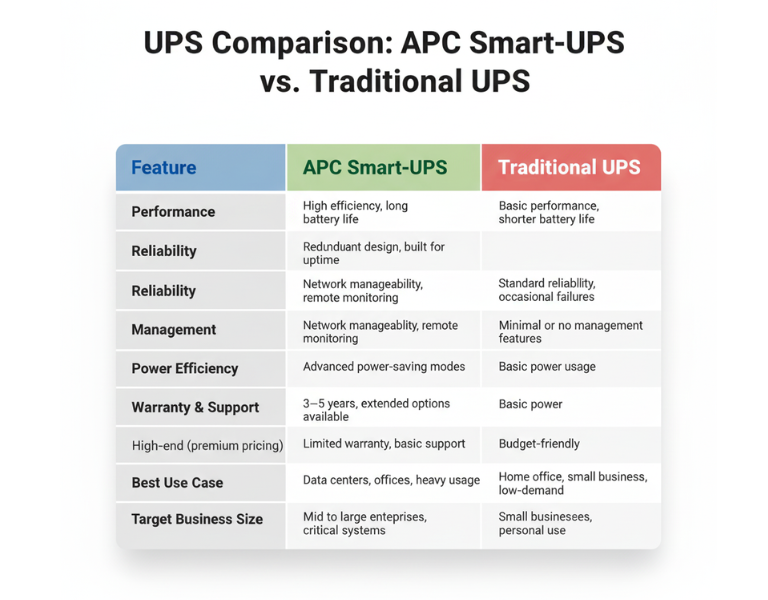
Comparison Table

Feature APC Smart-UPS Traditional UPS
Performance High efficiency, long battery life Basic performance, shorter battery life
Reliability Redundant design, built for uptime Standard reliability, occasional failures
Management Network manageability, remote monitoring Minimal or no management features
Power Efficiency Advanced power-saving modes Basic power usage
Warranty & Support 3?5 years, extended options available Limited warranty, basic support
Price Range High-end (premium pricing) Budget-friendly
Best Use Case Data centers, offices, heavy usage Home office, small business, low-demand
Target Business Size Mid to large enterprises, critical systems Small businesses, personal use

ÿ ÿ ÿ ÿ ÿ ÿ ÿ ÿ ÿ ÿ ÿ ÿ ÿ ÿ ÿ ÿ ÿ ÿ ÿ ÿ ÿ ÿ ÿ ÿ ÿ ÿ ÿ ÿ ÿÿ ÿ ÿ
Pros and Cons

APC Smart-UPS

Pros Cons
– Advanced network monitoring – Higher upfront cost
– Real-time health alerts – Requires setup and management
– Energy efficiency reduces costs – Overkill for small setups
– Longer battery life and proactive maintenance – More complex to install

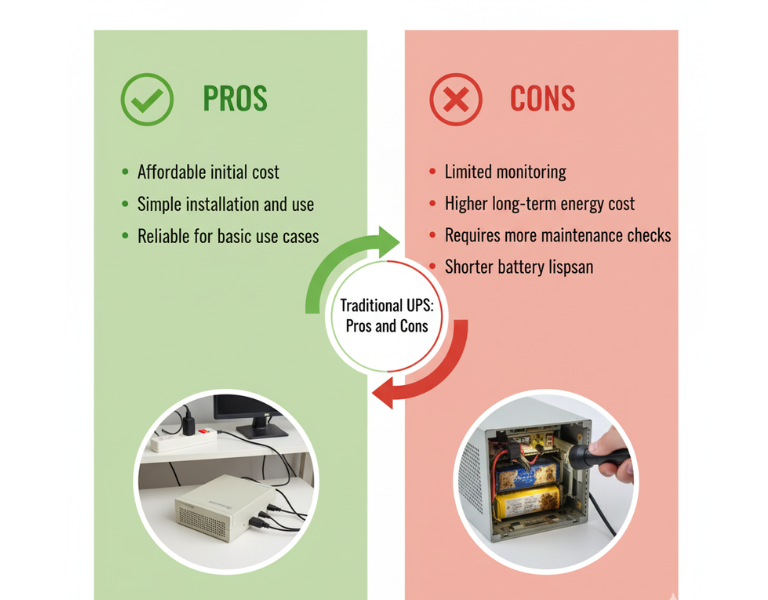
Traditional UPS

Pros Cons
– Affordable initial cost – Limited monitoring
– Simple installation and use – Higher long-term energy cost
– Reliable for basic use cases – Requires more maintenance checks
– Basic surge protection – Shorter battery lifespan

Expert Recommendation

For small businesses or home offices with limited infrastructure, a traditional UPS might be the most cost-effective choice. They?re simple to use and reliable for lower-demand environments, offering essential power protection without unnecessary complexity. However, if your business involves critical systems or you need remote monitoring across multiple locations, investing in an APC Smart-UPS will provide you with greater visibility and long-term savings. The upfront cost is higher, but the benefits of energy efficiency and remote management often outweigh the additional investment in the long run.


Real-World Use Cases

  • Design Studio (Small Business): A small design studio with 10 employees uses a traditional UPS system to protect their file servers and workstations. Since they don?t experience frequent power outages, the basic protection and lower upfront cost are sufficient for their needs.

  • Corporate Data Center (Large Enterprise): A data center with hundreds of servers relies on APC Smart-UPS units for continuous uptime. These units are monitored remotely, ensuring that any battery degradation is addressed before it becomes an issue, minimizing downtime.

  • Retail Store (Small Business): A retail store with a point-of-sale system and inventory management needs basic power protection. A traditional UPS is ideal for their low-maintenance requirements, offering reliability without overinvesting in features they won?t use.

  • Regional Office (Enterprise): A regional office for a large enterprise has several remote workstations that rely on network connectivity. APC Smart-UPS units provide energy efficiency and reduce the need for on-site monitoring. Staff can check UPS health remotely, reducing unnecessary visits and service calls.


Final Summary

Choosing between APC Smart-UPS and traditional UPS systems depends largely on your business size and needs. While traditional UPS systems work well for small-scale operations, APC Smart-UPS systems provide advanced features that make them ideal for larger enterprises or critical environments where uptime and energy efficiency are a priority.