Best APC Smart UPS for Business: Unmatched Protection & Efficiency

Introduction

Imagine your business?s network and equipment going down because of a power outage. For many businesses, this could result in significant data loss, expensive downtime, and unhappy clients. A Smart UPS (Uninterruptible Power Supply) can be the difference between maintaining continuity or losing critical business operations.

Choosing the right Smart UPS isn?t just about picking the cheapest option; it?s about ensuring that your systems remain up and running when the grid fails, all while optimizing power efficiency and managing energy consumption. This blog will help you pick the right UPS for your business?whether you?re a small startup or a large enterprise?without pushing any specific brand.


Brand Overview

  • APC by Schneider Electric: APC is one of the most recognized names in the UPS space. Known for their high-quality, reliable systems, APC is often the go-to for businesses that need peace of mind about their backup power systems. Their Smart UPS systems are scalable and come with advanced features like remote monitoring and robust energy efficiency.

  • CyberPower: A competitive brand offering a more affordable range of UPS systems, CyberPower is ideal for businesses that need reliable backup power without the high price tag. Their Smart UPS solutions often include cloud management, power-saving features, and a variety of form factors to suit different business needs.

  • Eaton: Eaton?s UPS systems are known for their durability and innovative design. They offer high-performance, highly customizable Smart UPS solutions that are particularly suited for larger networks or businesses requiring critical uptime with minimal power loss.


Comparison Table

Feature APC Smart-UPS SMC1500C CyberPower Smart App Sinewave PR1500LCD
Performance 1500VA, 900W, pure sinewave output 1500VA, 900W, pure sinewave output
Reliability High, with robust battery management and remote monitoring Good, with reliable battery performance for mid-sized setups
Management Advanced LCD display, SNMP/Web management LCD display, software-based management, cloud integration
Power Efficiency High efficiency with Green mode Energy-saving features with ECO mode
Warranty & Support 3-year warranty, 24/7 customer support 3-year warranty, lifetime tech support
Price Range $300 – $500 $200 – $400
Best Use Case Ideal for businesses with moderate to high power demands Small to medium businesses looking for reliable, cost-effective backup power
Target Business Size Small to medium-sized enterprises Small businesses and home offices

Pros and Cons

APC Smart-UPSÿSMC1500C

Pros:

  • Provides pure sinewave output, which is crucial for sensitive electronics.

  • Advanced monitoring features with SNMP compatibility.

  • High reliability and excellent customer support.

Cons:

  • Higher initial cost compared to some other options.

  • May be overkill for very small businesses with minimal power requirements.

CyberPower Smart App Sinewave PR1500LCD

Pros:

  • Affordable, with solid performance for mid-range needs.

  • Includes software for remote monitoring and cloud integration.

  • Energy-saving features with ECO mode for cost efficiency.

Cons:

  • Limited expandability compared to higher-end models.

  • May not be suitable for businesses with extremely high power demands.


Expert Recommendation

If your business needs a UPS system that can scale and provide reliable backup with advanced features like remote management, the APC Smart-UPS SMC1500C is a strong choice. It?s ideal for businesses where uptime is crucial, and you want the added benefit of energy efficiency and remote monitoring.

However, if you?re a smaller business with more basic backup needs and want to save on initial costs, the CyberPower Smart App Sinewave PR1500LCD offers excellent value for money. It?s still a powerful UPS with the essentials?sinewave output, remote monitoring, and eco-mode energy savings?without the higher price tag.


Real-World Use Cases

  1. Tech Startup (25 users): A small tech startup uses cloud-based applications and needs reliable backup for their office network. The CyberPower PR1500LCD is a great fit as it provides enough power and efficiency at a cost-effective price.

  2. Creative Agency (40 users): A creative agency needs a high-performance UPS for its design workstations and servers, with additional remote monitoring. The APC Smart-UPS SMC1500C would be ideal, ensuring consistent performance during power interruptions.

  3. Medical Practice (10 users): A medical office depends on continuous uptime for patient records and diagnostic equipment. A CyberPower Smart App Sinewave PR1500LCD ensures their devices stay powered with minimal maintenance.


Final Summary

Choosing the right Smart UPS depends on the size of your business and your specific power needs. For businesses requiring high performance and advanced features like remote management, APC Smart-UPS SMC1500C is a reliable, long-term investment. For smaller operations with a tighter budget, the CyberPower Smart App Sinewave PR1500LCD offers solid performance without the higher upfront cost.
Why APC Line-Interactive UPS is a Game Changer for Your Business

Introduction

In today?s business world, power interruptions can cause significant disruptions, resulting in lost productivity and potential damage to equipment. Whether you’re running servers, network equipment, or even a small office, reliable power protection is crucial.

The APC Line-Interactive UPS (Uninterruptible Power Supply) offers a practical, cost-effective solution for businesses of all sizes. Unlike basic surge protectors, it provides both surge protection and battery backup, ensuring your equipment stays operational during power outages and voltage fluctuations.

This blog explains why an APC Line-Interactive UPS can be a game changer for your business, offering a reliable, affordable solution to prevent downtime and protect your valuable IT assets.


What is an APC Line-Interactive UPS?

An APC Line-Interactive UPS is a power protection system that not only provides backup power during outages but also offers voltage regulation for minor power fluctuations. It works by automatically adjusting for slight variations in incoming power, saving your equipment from potential damage without immediately relying on the battery.

Key features include:

  • Automatic Voltage Regulation (AVR): Keeps the voltage stable, preventing equipment damage from voltage dips or surges.

  • Pure Sine-Wave Output: Provides clean, stable power to sensitive equipment, such as servers and networking devices.

  • SmartConnect: Enables cloud-based monitoring, providing real-time alerts and system status remotely.


Key Benefits of APC Line-Interactive UPS for Your Business

  1. Reliable Power Protection
    APC Line-Interactive UPS systems protect against power disruptions, such as blackouts, brownouts, and voltage spikes, ensuring your business stays operational.

  2. Cost-Effective Solution
    APC?s UPS systems offer excellent protection at a lower cost compared to more complex online UPS systems, making them ideal for small and medium-sized businesses.

  3. Energy Efficiency
    Designed to optimize energy use, these UPS systems provide the necessary power with minimal waste, helping reduce your business?s energy consumption and cost.

  4. Remote Monitoring
    With SmartConnect, you can monitor your UPS remotely, receive alerts, and track system health without needing physical access to the device.

  5. Scalability
    APC?s UPS systems are scalable, meaning you can easily add additional units as your business grows, ensuring long-term protection without major upgrades.


APC Line-Interactive UPS: Ideal for Small to Medium-Sized Businesses

The APC Line-Interactive UPS is a perfect fit for businesses that:

  • Require reliable protection for IT equipment such as servers, routers, and POS systems.

  • Need an affordable yet dependable solution for power backup.

  • Operate in areas with moderate power quality issues, such as occasional surges and sags.

  • Seek easy-to-manage, remote-monitoring features without extensive infrastructure needs.


Comparison Table: APC Line-Interactive UPS Models

Feature APC Smart-UPS 1000VA APC Smart-UPS 1500VA APC Smart-UPS 2200VA
Performance 1000VA / 600W 1500VA / 900W 2200VA / 1320W
Voltage Regulation Automatic Voltage Regulation (AVR) AVR AVR
Power Efficiency High High High
Pure Sine-Wave Output Yes Yes Yes
Warranty & Support 3 years 3 years 3 years
Remote Monitoring SmartConnect SmartConnect SmartConnect
Price Range $450?$550 $650?$750 $1,100?$1,300
Best Use Case Small office or home office Small to medium-sized business Medium-sized business or rack setups
Target Business Size Up to 15 users 15?30 users 30+ users

Pros and Cons of APC Line-Interactive UPS

APC Smart-UPS 1000VA

Pros:

  • Cost-effective for small office use.

  • Provides essential surge protection and backup power.

  • Pure sine-wave output for sensitive devices.

Cons:

  • Limited to smaller setups (under 15 users).

  • Shorter runtime under full load compared to higher-capacity models.

APC Smart-UPS 1500VA

Pros:

  • Ideal for medium-sized businesses or server rooms.

  • Good power capacity and longer battery runtime.

  • Reliable AVR for consistent voltage regulation.

Cons:

  • Higher initial cost than the 1000VA model.

  • Slightly bulkier than smaller models.

APC Smart-UPS 2200VA

Pros:

  • Excellent for businesses with heavier IT equipment.

  • Longer runtime under load, suitable for multiple servers.

  • Strong reliability with high-capacity power.

Cons:

  • Larger footprint and higher price point.

  • May be overkill for small offices or light loads.


Expert Recommendation: Is APC Line-Interactive UPS Right for Your Business?

For small to medium-sized businesses, the APC Smart-UPS 1500VA provides the best balance of cost, capacity, and features. It offers strong protection for servers and network devices, making it ideal for businesses looking for affordable yet reliable power backup.

If you?re operating a small office with minimal IT infrastructure, the 1000VA model may be sufficient. However, for larger operations with multiple devices, the 2200VA model will provide ample capacity and ensure the longevity of your equipment, particularly if you?re dealing with more sensitive or high-demand setups.


Real-World Use Cases for APC Line-Interactive UPS

  1. Small Design Studio (10-15 users)
    A design studio with a few high-powered workstations benefits from the APC Smart-UPS 1000VA, providing surge protection and backup power during outages to prevent data loss and keep the creative process uninterrupted.

  2. Growing Office with Multiple Servers (20-30 users)
    A marketing company with multiple servers, network switches, and workstations would rely on the APC Smart-UPS 1500VA, offering robust backup power, energy efficiency, and seamless monitoring through SmartConnect.

  3. Larger Office Setup (30+ users, multiple racks)
    A tech company with a small data center would use the APC Smart-UPS 2200VA, ensuring that multiple servers, routers, and storage systems remain operational during power disruptions, with enough capacity to handle the growing IT demands.


Conclusion: Keep Your Business Running with APC Line-Interactive UPS

APC Line-Interactive UPS systems provide small and medium-sized businesses with affordable, reliable, and efficient power protection. With features like AVR, remote monitoring, and pure sine-wave output, APC ensures that your business operations remain uninterrupted, even during power fluctuations. Whether you?re a growing office or managing a network of critical devices, APC?s Line-Interactive UPS models offer a smart investment in power security.

APC Smart-UPS vs. Traditional UPS: Which One Should You Choose?

Introduction

Choosing the right Uninterruptible Power Supply (UPS) is crucial for keeping your critical systems online during power outages. If you’re considering options, you’re likely debating between APC?s Smart-UPS line and traditional UPS systems. The decision impacts your performance, energy consumption, maintenance costs, and overall reliability. In this blog, we?ll compare these two types of UPS systems, focusing on their advanced features like remote monitoring, energy efficiency, and cost-effectiveness. By the end, you’ll have the information to choose the best UPS for your business?whether you?re a small office or a large enterprise.

ÿ ÿ ÿ ÿ ÿ ÿ ÿ ÿ ÿ ÿ ÿ ÿ ÿ ÿ ÿ ÿ ÿ ÿ ÿ ÿ ÿ ÿ ÿ ÿ ÿ ÿ ÿ ÿ ÿ ÿÿ ÿ


APC Smart-UPS Overview

APC Smart-UPS line is designed for high performance, providing excellent power protection with advanced features such as network manageability, remote monitoring, and energy efficiency. This line is perfect for businesses of all sizes, especially those looking for detailed control and long-term savings. APC Smart-UPS is built for users who need consistent uptime and minimal disruption, with cloud connectivity that allows IT managers to monitor UPS health and status remotely.

Traditional UPS Overview

Traditional UPS systems are more straightforward, offering basic battery backup and surge protection. They?re typically more affordable upfront and may serve well for small businesses or environments with fewer critical systems. However, they lack the advanced monitoring capabilities and energy efficiency that come with APC Smart-UPS units. For many, this can mean more frequent maintenance checks, higher operational costs, and the risk of unexpected downtimes.


Comparison Table

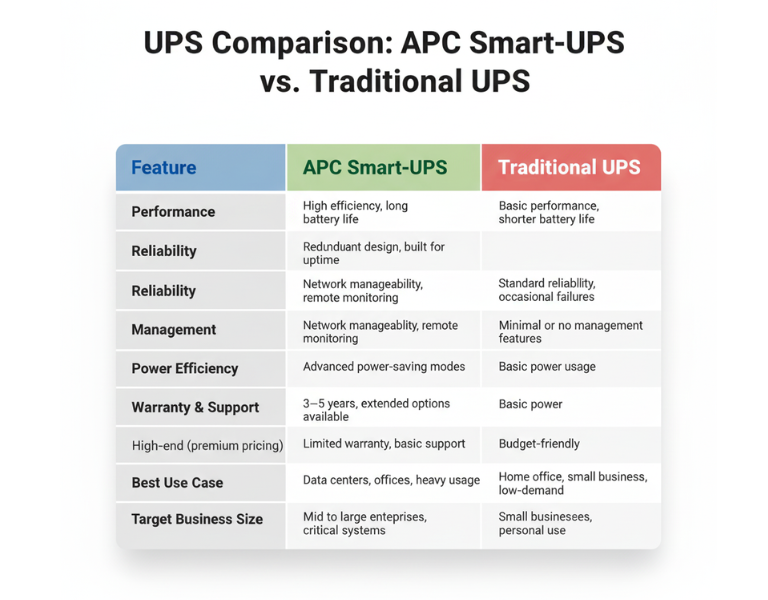
Feature APC Smart-UPS Traditional UPS
Performance High efficiency, long battery life Basic performance, shorter battery life
Reliability Redundant design, built for uptime Standard reliability, occasional failures
Management Network manageability, remote monitoring Minimal or no management features
Power Efficiency Advanced power-saving modes Basic power usage
Warranty & Support 3?5 years, extended options available Limited warranty, basic support
Price Range High-end (premium pricing) Budget-friendly
Best Use Case Data centers, offices, heavy usage Home office, small business, low-demand
Target Business Size Mid to large enterprises, critical systems Small businesses, personal use

ÿ ÿ ÿ ÿ ÿ ÿ ÿ ÿ ÿ ÿ ÿ ÿ ÿ ÿ ÿ ÿ ÿ ÿ ÿ ÿ ÿ ÿ ÿ ÿ ÿ ÿ ÿ ÿ ÿÿ ÿ ÿ
Pros and Cons

APC Smart-UPS

Pros Cons
– Advanced network monitoring – Higher upfront cost
– Real-time health alerts – Requires setup and management
– Energy efficiency reduces costs – Overkill for small setups
– Longer battery life and proactive maintenance – More complex to install

Traditional UPS

Pros Cons
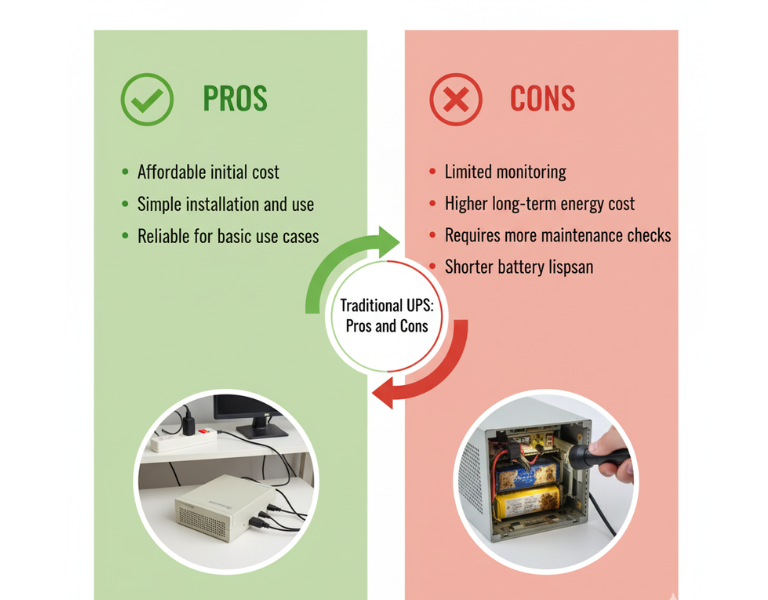
– Affordable initial cost – Limited monitoring
– Simple installation and use – Higher long-term energy cost
– Reliable for basic use cases – Requires more maintenance checks
– Basic surge protection – Shorter battery lifespan

Expert Recommendation

For small businesses or home offices with limited infrastructure, a traditional UPS might be the most cost-effective choice. They?re simple to use and reliable for lower-demand environments, offering essential power protection without unnecessary complexity. However, if your business involves critical systems or you need remote monitoring across multiple locations, investing in an APC Smart-UPS will provide you with greater visibility and long-term savings. The upfront cost is higher, but the benefits of energy efficiency and remote management often outweigh the additional investment in the long run.


Real-World Use Cases

  • Design Studio (Small Business): A small design studio with 10 employees uses a traditional UPS system to protect their file servers and workstations. Since they don?t experience frequent power outages, the basic protection and lower upfront cost are sufficient for their needs.

  • Corporate Data Center (Large Enterprise): A data center with hundreds of servers relies on APC Smart-UPS units for continuous uptime. These units are monitored remotely, ensuring that any battery degradation is addressed before it becomes an issue, minimizing downtime.

  • Retail Store (Small Business): A retail store with a point-of-sale system and inventory management needs basic power protection. A traditional UPS is ideal for their low-maintenance requirements, offering reliability without overinvesting in features they won?t use.

  • Regional Office (Enterprise): A regional office for a large enterprise has several remote workstations that rely on network connectivity. APC Smart-UPS units provide energy efficiency and reduce the need for on-site monitoring. Staff can check UPS health remotely, reducing unnecessary visits and service calls.


Final Summary

Choosing between APC Smart-UPS and traditional UPS systems depends largely on your business size and needs. While traditional UPS systems work well for small-scale operations, APC Smart-UPS systems provide advanced features that make them ideal for larger enterprises or critical environments where uptime and energy efficiency are a priority.

How to Choose the Right APC UPS for Your Data Center: A Step-by-Step Guide

Introduction:

When managing a data center, the reliability of your uninterruptible power supply (UPS) is crucial for keeping everything running smoothly. Without the right UPS, your equipment could face downtime during power outages, resulting in significant data loss or system failure. But with so many models and specifications out there, how do you choose the right APC UPS for your environment?

In this blog, we’ll walk through the key factors to consider when choosing a UPS. Whether you?re looking to support a small office or a large-scale data center, we?ll cover all the technical aspects so you can make an informed decision. This guide doesn?t push a specific model ? it?s about helping you choose the right APC UPS to meet your needs.


Brand Overview:

APC by Schneider Electric is a leading brand in the UPS industry, known for providing reliable, scalable, and energy-efficient solutions for businesses of all sizes. From small office environments to massive data centers, APC offers a range of UPS systems designed to keep critical systems up and running during power disturbances.


Key Factors to Consider When Choosing the Right APC UPS:

1. Power Capacity

  • Why it matters: The power capacity determines how much load the UPS can handle before it runs out of battery. Ensure the UPS can handle your equipment?s power requirements, including a buffer for future growth.

  • Tip: Always choose a UPS with a bit of extra capacity (20?30%) to accommodate additional devices or unforeseen power spikes.

2. Battery Runtime

  • Why it matters: How long will the UPS keep your systems running in the event of a power failure? Battery runtime is key for uninterrupted operation.

  • Tip: Be sure to consider the battery runtime required for your critical systems, as longer runtime typically comes with a higher cost.

3. Form Factor (Tower vs. Rack-Mounted)

  • Why it matters: The physical setup of your data center will dictate whether a tower or rack-mounted UPS is best for your space.

  • Tip: Rack-mounted UPS systems are ideal for space-efficient environments, while tower models might be better suited for smaller setups with minimal rack space.

4. Scalability

  • Why it matters: Your UPS should be able to scale as your data center grows. Look for models that allow you to add more batteries or modules as needed.

  • Tip: Choose a modular system for scalability, allowing you to expand without replacing the entire system.


Common Pitfalls to Avoid When Choosing a UPS:

  • Underestimating Power Needs: Ensure you calculate the total wattage of all devices connected to the UPS. Avoid buying a UPS with too little capacity, as it could fail to protect your critical systems.

  • Ignoring Future Growth: Consider your future power needs and choose a UPS with the ability to scale. An undersized UPS could result in system shutdowns or damaged hardware.

  • Not Considering Efficiency: Energy efficiency is important for long-term cost savings. Look for models with high efficiency to minimize energy costs and reduce your environmental footprint.


Comparison Table:

Feature APC Smart-UPS APC Back-UPS
Power Capacity 1 kVA to 20 kVA 400 VA to 1.5 kVA
Battery Runtime 10?40 minutes 5?20 minutes
Form Factor Rack & Tower Tower only
Scalability Modular, expandable Limited scalability
Efficiency High Efficiency Standard
Best Use Case Data Centers, Servers Small Office, Home Office
Target Business Size Enterprise, SMB Small Business

Pros and Cons (APC Smart-UPS vs. APC Back-UPS):

APC Smart-UPS

Pros:

  • High efficiency and energy savings

  • Scalable, with modular battery options

  • Ideal for data centers and enterprise environments

Cons:

  • Higher initial cost

  • Requires more space due to larger units

APC Back-UPS

Pros:

  • Affordable, great for small offices

  • Compact design

  • Reliable protection for low-power devices

Cons:

  • Limited scalability

  • Lower battery runtime compared to Smart-UPS


Expert Recommendation:

  • For small businesses or home offices: The APC Back-UPS is a great option. It’s affordable, compact, and provides reliable power protection for basic needs.

  • For data centers or larger enterprise environments: The APC Smart-UPS is the better choice due to its higher capacity, scalability, and efficiency. It?s an investment that will pay off by ensuring uptime and minimizing energy costs in the long run.


Real-World Use Cases:

  • Small Office (10?20 employees): The APC Back-UPS 800VA provides essential backup power to protect servers, computers, and networking equipment, ensuring productivity during short power outages.

  • Data Center (100+ devices): An APC Smart-UPS 10kVA with extended battery runtime would support mission-critical servers and networking equipment, keeping everything operational during longer power disruptions.


Final Summary:

When choosing the right APC UPS for your data center, focus on capacity, scalability, and battery runtime. Consider the future growth of your infrastructure and the specific needs of your organization. Whether you need a small office solution or enterprise-level protection, APC has a range of products designed to meet your needs.

Best Network Switch for Small Business

Quick summary

For most small businesses a managed Gigabit switch with PoE on some ports is the best choice. If you need higher throughput for servers or virtualization, choose a 10G-capable distribution switch and keep cheaper Gigabit switches at the access layer. HPE and Netgear are strong picks. Cisco, Ubiquiti and TP-Link are also good depending on priorities: support and lifecycle, usability, or price.


Top 5 brands for small business (in priority order)

  1. HPEÿ(Aruba) ? enterprise-grade features and support, long lifecycle.

  2. Netgear ? best value and straightforward enterprise features for SMBs.

  3. Cisco Small Business / Catalyst models ? strong enterprise features and integration.

  4. Ubiquiti (UniFi) ? best tooling for simple centralized management and scale via controller.

  5. TP-Link (Omada) ? budget friendly, capable management for small deployments.


Examples of typical models to evaluate (use these as reference points)

  • HPE Aruba 2530 / 2930F family for SMB distribution or core.

  • Netgear Smart Managed or M4300 series for 10G-ready SMB cores and AV.

  • Cisco Business/Catalyst small campus switches for long-term enterprise support.

  • Ubiquiti UniFi Switch USW series for controller-driven networks.

  • TP-Link Omada managed Gigabit switches for constrained budgets.


Which switch to use where

  • Access layer (workstations, IP phones, APs)
    Choose Gigabit managed switch with PoE ports for APs and phones. 8, 16, or 24 port based on device count.

  • Distribution layer (aggregation between access and core)
    Use 10G uplinks or 25G if planned growth is high. Look for stacking or MLAG for redundancy.

  • Core layer (small data center or server aggregation)
    Use 10G or 25/40/100G depending on server density and virtualization needs. Prefer switches with stronger L3 features and hardware forwarding.

  • Branch/remote sites
    Use compact managed switches with local PoE and remote management capability.


Affordability vs reliability (practical rule)

  • If budget is primary and team is small: use Netgear or TP-Link Omada. Expect manual intervention for complex issues.

  • If uptime matters and you need vendor SLAs: choose HPE or Cisco. Higher CAPEX, but lower reactive OPEX for major incidents.

  • If you want easy centralized management and moderate price: consider Ubiquiti.


In-depth comparison table

This table gives pros, cons and suitability at a glance to help customers decide.

Brand Strengths Weaknesses Typical best use Affordability
HPE (Aruba) Strong enterprise features, stable firmware, advanced CLI and controllers, long lifecycle and global support Higher initial cost, licensing for some features Campus cores, regulated environments, large SMBs that require SLAs Expensive
Netgear Excellent value for features, easy to deploy, good PoE support, straightforward stacking Fewer enterprise automation tools, variable advanced feature parity SMB access and distribution, AV-over-IP, branches Mid / affordable
Cisco (Small Business / Catalyst) Mature feature set, deep integrations, proven at scale, enterprise support options Higher price, more complex to operate Enterprises with Cisco stacks, MSP-managed customers Expensive
Ubiquiti (UniFi) Centralized controller, ease of use, good balance of price and features, strong for wireless + switch integration Less enterprise-grade SLAs, firmware changes can affect workflows Small multi-site deployments, managed Wi-Fi + switch ecosystems Mid / affordable
TP-Link (Omada) Very cost-effective, decent management features for the price Less robust in large deployments, limited advanced features Very small offices, budget-conscious installs Cheap / best low budget

Pros and cons by technical aspect (quick engineer checklist)

  • Management and monitoring
    HPE and Cisco offer the deepest telemetry. UniFi is easiest for centralized GUI. Netgear and TP-Link provide adequate monitoring for SMBs.

  • Redundancy and high availability
    HPE/Cisco provide richer HA features (multi-chassis stacking, MLAG). Netgear offers stacking and NSF on higher models. UniFi has limited HA at switch layer.

  • PoE and power planning
    Check PoE budget per switch. Netgear and TP-Link offer strong PoE density at reasonable cost. HPE offers flexible power modules and redundant PSU options on higher-end models.

  • Firmware and lifecycle
    HPE and Cisco have conservative, enterprise-quality releases. Firmware on consumer-focused lines may change behavior more often.

  • Support and RMA
    HPE and Cisco offer better global SLAs and on-site replacement options. Netgear warranty is good for SMBs; TP-Link and Ubiquiti support is more community plus paid options.

  • Automation and APIs
    HPE and Cisco are API-first in many enterprise models. Netgear has CLI and some REST capability on newer lines. UniFi has controller API useful for integrations.


How to choose the right switch for a specific small business

Follow these steps. They are practical and field-tested.

  1. Count devices per closet and per floor. Include APs, phones, cameras, printers, servers.

  2. Decide PoE needs. Calculate maximum wattage per switch and plan headroom 20?30% for growth.

  3. Determine uplink speed. If multiple servers or a virtualization host attach, use 10G uplinks at distribution.

  4. Choose management level. If you want zero-touch and central UI, pick UniFi or Omada. If you need enterprise features, pick HPE/Cisco.

  5. Plan redundancy. For single-site SMBs, dual uplinks and STP or MLAG-like features are minimum. For multi-site, central-managed stacking is valuable.

  6. Prototype before roll-out. Deploy one switch in production-like conditions for at least 7 days. Validate QoS, PoE, firmware behavior and management workflows.


Specific recommendations by business size and need

  • Small office up to 20 users, single site, limited budget
    Recommendation: Netgear Smart Managed or TP-Link Omada Gigabit switch with 8?16 ports. Choose some PoE ports if you have VoIP or APs.

  • Small business 20?100 users, plan growth, need reliability
    Recommendation: Netgear M4300 family for balanced cost and features. Consider HPE Aruba 2530 if lifecycle and support are priorities. Use 10G uplinks for server racks.

  • Multi-floor office or university building with many APs and VoIP phones
    Recommendation: HPE Aruba 2930F/6300 family for robust VLAN, policy control and centralized management.

  • Small data center or virtualization host aggregation
    Recommendation: 10G-capable switches from Netgear M4300 or HPE 2930/5900 depending on budget. Ensure stacking and L3 features.

  • Retail stores with many branches (managed by MSP)
    Recommendation: Netgear or Ubiquiti for consistent configuration, remote management and cost control.


Buying checklist to hand the procurement team

  • Number of ports required now and in 3 years.

  • PoE watts required per device and total per switch.

  • Uplink speed requirements.

  • Stacking or redundancy needs.

  • Support SLA requirement and budget for care packs.

  • Mounting, acoustic, and power (rack space, heat, PSU redundancy).

  • Management preference: GUI vs CLI vs API.

  • Budget bands: cheap (TP-Link), affordable (Netgear/Ubiquiti), premium (HPE/Cisco).


Final recommendations (short and actionable)

  • If you need lowest TCO and fast deployment: pick Netgear. Start with 24-port PoE Gigabit at the access layer and a 10G Netgear M4300 as distribution if you have servers.

  • If uptime, long-term support and lifecycle matter more than CAPEX: pick HPE. Budget for care packs and plan for centralized controller.

  • If you want easiest centralized management for combined Wi-Fi and switching with good price: pick Ubiquiti UniFi.

  • For very tight budgets and simple sites: TP-Link Omada. Keep in mind shorter upgrade cycles.

Netgear vs HPE Switches: Finding the Right Fit for Your Business Network

Introduction

Every business network eventually hits the same fork in the road. do you go with Netgear or HPEÿfor your switching backbone? Both brands have earned respect in enterprise networking, but their gear serves slightly different kinds of users. Choosing the wrong one can lead to wasted budget, missed performance targets, and unnecessary complexity. Let?s break it down from a real engineer?s point of view, based on deployment experience, not marketing slides.


Where Netgear Switches Make Sense

If you?re managing a mid-size enterprise, campus, or AV-over-IP deployment, Netgear delivers a lot of value without over-engineering. Models like the M4300 or M4500 series give you 10G to 100G throughput, stackable architecture, and solid Layer-3 features at a fraction of what big brands usually charge.

Why Netgear works:

  • Plug-and-play stack setup for quick scaling

  • Easy GUI or CLI management through Netgear NMS300

  • Silent or near-silent cooling ideal for office or AV spaces

  • Great PoE+ and PoE++ coverage for IP cameras and access points

It?s the right choice when you need reliability and simplicity. You don?t want to spend a week configuring VLAN trunks just to get your wireless and servers online.


When HPE Switches Are the Better Fit

HPE?s Aruba and FlexNetwork lines are built for larger, heavily segmented enterprise networks where central policy control, user authentication, and analytics are critical. They shine in environments with hundreds of access switches feeding into a redundant core, such as universities or healthcare systems.

Why HPE stands out:

  • Deep integration with Aruba Central for cloud management

  • Full Layer-3+ routing with advanced security policies

  • Multi-chassis link aggregation for high-availability cores

  • Longer lifecycle support and firmware stability

If your environment runs multiple VLANs, security overlays, or complex QoS policies, HPE handles that better out of the box. But you?ll pay more for licensing and maintenance.


Comparing the Two: Cost vs. Capability

Criteria Netgear Switches HPE Switches
Price Range Lower initial cost, no mandatory licenses Higher cost, includes enterprise features
Ease of Setup Simple and fast Requires deeper configuration
Performance Excellent for 10G/25G/100G edge and AV use Strong for multi-tenant enterprise cores
Support & Warranty Lifetime hardware warranty Extended warranty via Care Packs
Management Web GUI, CLI, NMS300 Aruba Central, IMC, CLI, SNMP
Best Use Case SMB to mid-enterprise, AV, campus Large enterprise, data center, universities

Affordability and Reliability

Netgear wins on cost-to-performance ratio. You get enterprise-grade switching power at SMB-friendly pricing. Its reliability record has improved significantly over the past decade, especially in the M4300 and M4500 ranges.

HPE, on the other hand, emphasizes uptime and long-term support. Firmware releases are stable, hardware redundancy is built-in, and their global support network is unmatched ? but the price reflects it.


Pros and Cons

Netgear Pros:

  • Lower TCO (Total Cost of Ownership)

  • Simple learning curve

  • Excellent performance in AV-over-IP or branch networks

  • Lifetime warranty on hardware

Netgear Cons:

  • Fewer SDN and analytics options

  • Limited third-party integration

HPE Pros:

  • Rich security and automation ecosystem

  • Strong cloud-based monitoring (Aruba Central)

  • Proven stability in large-scale deployments

HPE Cons:

  • High upfront and license costs

  • Complex management for small teams


Recommendations by Business Type

  • Small to Mid-Size Businesses: Go with Netgear M4300 series ? you?ll get the most performance per dollar and simple management.

  • AV Integrators and Media Studios: Use Netgear M4500 series, built for multicast and 100G streaming.

  • Large Enterprises and Campuses: Choose HPE Aruba 6300/6400 lines for scalability, redundancy, and advanced policy control.

  • Data Centers: HPE?s higher-end FlexNetwork series suits virtualized workloads and automation environments.


Final Thoughts

Both brands build excellent switches, but the right choice depends on how deep your network stack goes.
If you value ease, cost-efficiency, and solid 10G/25G performance, Netgear is the smarter choice.
If your network needs multi-layer policy control, advanced routing, and centralized visibility, HPE justifies its cost.

The real trick is aligning the switch with your team?s skills, uptime expectations, and growth plan ? not just the logo on the front panel.

Netgear XSM4348CS-100NES Review: Enterprise-Grade 10G Layer-3 Stackable Switch

The Netgear XSM4348CS-100NES belongs to the M4300 series, a lineup known for enterprise reliability and flexibility in converged networks. Designed for core, aggregation, and AV-over-IP roles, this switch bridges the gap between high-density copper access and scalable Layer-3 routing.

What sets the XSM4348CS apart is its balance of port versatility, 960 Gbps non-blocking fabric, and redundant PSU architecture. It?s the kind of device network engineers rely on when uptime and manageability matter more than flashy marketing claims.

This review breaks down its hardware, features, and deployment value in real-world enterprise scenarios.


?? Hardware and Build Quality

The chassis is a 1U rack-mount form factor with a clean, modular layout. Netgear?s design focuses on efficient airflow and dual-PSU readiness, allowing you to hot-swap power units without downtime a crucial feature for 24/7 environments.

Inside, the switch runs a 960 Gbps switching fabric, ensuring full-speed forwarding even under maximum load. Engineers will appreciate the hitless failover (NSF) capability ? during stack reboots or firmware updates, forwarding continues without dropping packets.

Image Placement:
Close-up shot of power module bays and stacked configuration ports.
Alt Tag: Netgear XSM4348CS dual PSU design and stacking interfaces.


Netgear M4300 vs M4500: Which Switch Series Fits Your Enterprise Network?

When choosing between Netgear M4300 and M4500 switches, IT teams often find overlapping specifications but very different deployment purposes. Both families deliver reliable 10G and 100G connectivity, but their design intent, scalability, and management depth vary considerably.
This guide breaks down the differences and helps you decide which series fits best in your enterprise, campus, or data center architecture.


?? Netgear M4300 Series ? Modular and Flexible for Core & Edge

The Netgear M4300 series is engineered for mid-sized enterprises, branch offices, and AV-over-IP environments that require balanced performance and quiet operation. These are Layer-3 stackable managed switches with flexible port configurations ranging from Gigabit to 10-Gigabit speeds.

Key Highlights

  • Non-blocking 10G switching fabric.

  • Stack up to 8 units via copper or fiber.

  • PoE+ options for powering access points and IP cameras.

  • Simple GUI or CLI management for quick setup.

Recommended Models to Check

For enterprise deployments or AV environments:

?? Netgear M4500 Series ? Built for 100G and High-Density Data Centers

Stepping up to the M4500 family introduces 100-Gigabit uplinks, 25G access ports, and advanced multicast control, making it ideal for large-scale data centers and AV broadcast networks.
These switches are designed for low-latency switching, spine-and-leaf architectures, and environments demanding predictable high bandwidth.

Key Highlights

  • 10G/25G access with 100G uplinks.

  • 3.6 Tbps switching fabric with ultra-low latency.

  • Designed for high-availability campus or virtualization backbones.

  • Full automation via CLI, REST API, and Netgear Insight.

Featured Models

These units provide the bandwidth headroom and redundancy essential for next-generation enterprise networks.

Best Laptops 2024 (All Brands Laptops)

Best Laptops Brands 2024 (Top 10 Laptops)

Elevate Your Tech Game in 2024 withÿDC Supplies ? Your Ultimate Laptop Destination! Explore Unbeatable Prices on the Finest Laptops. Don’t Miss the Chance to Enhance Your Tech Experience Today!

In 2023, the USA tech market is brimming with enticing laptop options that offer outstanding performance at the lowest prices, all thanks to the reputable company DC Supplies. These budget-friendly laptops feature the latest processors, efficient DC supplies, and impressive build quality, making them a top choice for cost-conscious consumers.

With a focus on affordability, DC Supplies laptops don’t compromise on essential features. They deliver robust computing power, vivid displays, and reliable battery life, catering to students, professionals, and casual users alike. Whether you’re working on assignments, streaming content, or simply browsing, these laptops provide excellent value without breaking the bank.

Explore top-tier laptops at DC Supplies, where you'll uncover unbeatable everyday prices, with the option to conveniently shop online for delivery or in-store pick-up.

Laptops For Saleÿ

1. LG Electronics 17Z90P-N.APS5U1 17″ LG gram Laptop with Windows 10 Pro OS, 16GB RAM, 512GB SSD, Core i7 Processor = Price :ÿ$1,285.00

>ÿBuy Now

2. Microsoft 5V8-00001 Surface Laptop 4 R7 8GB 256GB 15″ Platinum = Price :ÿ$975.00

>ÿBuy Now

3. Microsoft RIR-00001 Surface Laptop 5 – 15″ i7 16GB 512GB SSD Windows 10 Pro – Platinum = Price :ÿ$1,815.00

>ÿBuy Now

4. LG Electronics LG Gram Notebook 14ZT90P-G.AM32U1 14 I3-1115G4 8GB 256GB Windows 10 IoT Enterprise LTSC = Price :ÿ$915.00

>ÿBuy Now

5. LG 15Z90P-N.APS7U1 Electronics LG Gram 15″ Lightweight Notebook, Hardware TPM, Windows 10PRO, Core i7 = Price :ÿ$1,265.00

>ÿBuy Now

6. LG 16U70Q-N.APC5U1 Electronics LG Ultra Notebook 17 RYZEN5 5625U 8GB 512GB AMD Radeon W11P = Price :ÿ$798.00

>ÿBuy Now

7. LG Electronics LG Ultra Notebook 16U70Q-N.APC7U1 17 RYZEN7 5825U 16GB 2X512GB AMD = Price :ÿ$1,175.00

> Buy Now

8.ÿLG Electronics LG Gram Notebook 17ZT90P-G.AX33U1 17 2560X1600 8GB LPDDR4 256GB Non OS = Price :ÿ$1,055.00

>ÿBuy Now

9.ÿLenovo 21JT001PUS ThinkPad E16 G1 Ryzen 5 7530U 2G 8GB 256GB SSD 16 inch NT W11P = Price :ÿ$710.00

> Buy Now

10.ÿHP 50V75UA 15″ I3-1115G4 8GB WIN11 Touch = Price :ÿ$468.00

>ÿBuy Now

Laptops, notebooks, and Chromebooks encompass a vast array of computing devices, each catering to distinct needs and preferences. Here, we offer an A to Z overview of leading brands, their system requirements, RAM configurations, processor options (i3, i5, and i7), and screen sizes, providing comprehensive insight into your options:

Acerÿ– Acer laptops cover the spectrum, from budget-friendly notebooks with Intel Core i3 processors and 4GB RAM to high-performance machines boasting Core i7 CPUs, 16GB RAM, and expansive 17-inch displays.

Dell – Dell’s range spans from Latitude business laptops with i5 CPUs and 8GB RAM to XPS ultrabooks featuring Core i7 processors, 16GB RAM, and stunning InfinityEdge displays.

HP – HP laptops encompass everything from affordable Stream notebooks (i3, 4GB RAM) to Spectre x360 2-in-1s (i7, 16GB RAM) with vibrant 15.6-inch OLED screens.

Lenovo – Lenovo ThinkPad series offers business-class laptops with Core i5 CPUs and 8GB RAM, while Yoga 2-in-1s boast i7 processors, 16GB RAM, and versatile screen sizes, including 14 and 15.6 inches.

Microsoft – Microsoft Surface devices combine style and function, with Surface Laptop featuring i5 processors, 8GB RAM, and 13.5-inch PixelSense displays, and Surface Book offering i7 CPUs, 16GB RAM, and detachable 13.5 or 15-inch screens.

Razer – Razer Blade laptops stand out with i7 CPUs, 16GB RAM, and stunning 13.3 to 17.3-inch displays, tailored for gamers and content creators.

Samsung – Samsung Galaxy laptops provide versatility, with options like the Galaxy Book Pro (i5, 8GB RAM, 15.6-inch AMOLED) and Galaxy Chromebook (i3, 8GB RAM, 13.3-inch 4K AMOLED).

Chromebooks – Chromebooks, available from multiple brands, typically feature lower-end processors like i3 or less, 4-8GB RAM, and come in a range of screen sizes, including compact 11.6-inch to larger 15.6-inch displays.

These diverse brands and their respective laptop, notebook, and Chromebook offerings cater to a wide spectrum of users, ensuring that there’s a suitable option for everyone, whether you require basic computing power or high-end performance for gaming, creativity, or professional tasks. Carefully consider your needs, budget, and preferences when selecting the perfect device to meet your computing requirements

Top 10 Laptops